


Best Shopify Analytics Apps in 2026: Beyond Google Analytics
Written for Shopify stores running paid acquisition, where a customer routinely sees an ad on a phone and buys on a laptop three days later. If your traffic is mostly organic and single-device, several of the problems below will not be yours.
• Shopify Analytics plus GA4 answer "what" and most of "where" for free.
• Microsoft Clarity (free) answers "why" with session recordings and heatmaps, and it is the category most stores are missing.
• An attribution platform answers "who" and should be the last purchase, not the first.
• Before any of it, check that your events and orders record correctly, because every answer inherits a tracking error.
- The tool we never install first
- Why GA4 can't answer "why"
- What happened: Shopify Analytics, GA4, Triple Whale, Polar
- Where it happened: funnel and path analysis
- Why it happened: Microsoft Clarity, Heatmap, Hotjar, post-purchase surveys
- Who did it: segmentation and attribution
- The layer underneath all four: tracking integrity
- What we run at Weblics
- Where to start
- Glossary
- FAQ
The Shopify Analytics Tool We Never Install First
Attribution answers "who deserves the credit", which is a reasonable question and the wrong one to start with. It is the most expensive category on the market, it is modeled rather than measured, and installing one before you can answer anything else gives you a confident number built on a foundation you have not checked.
The reason stores reach for it anyway is that it feels like the missing piece. Three dashboards disagree, so the instinct is that a fourth will settle it. It will not. It will disagree with the other three in a new way, and now you will have four numbers and the same meeting.
You do not have a tooling problem. You have a question you have not named.
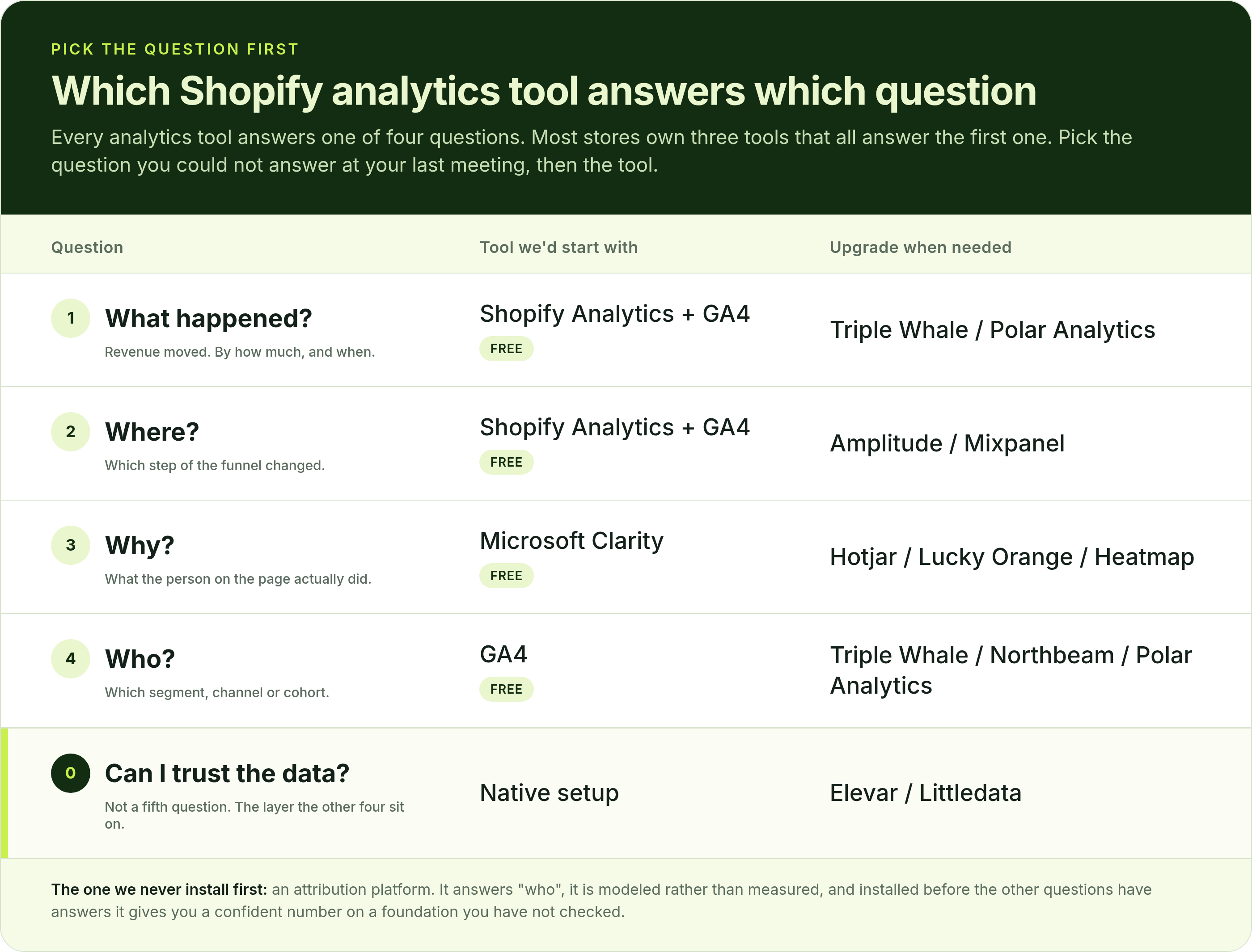
Every analytics tool on the market answers one of four questions, and most stores own three tools that all answer the first one.
• What happened? Revenue moved. By how much, and when.
• Where did it happen? Which step of the funnel changed.
• Why did it happen? What the person on the page actually did.
• Who did it? Which segment, channel or cohort.
Pick the question you could not answer at your last meeting. That decides your tool.
Why GA4 Can't Answer "Why" on a Shopify Store
Some rows can be withheld. GA4 can withhold rows when privacy thresholds apply, particularly in reports or explorations using demographics, Google Signals or low-volume sensitive dimensions. Google's stated purpose is "to prevent anyone viewing a report or exploration from inferring the identity or sensitive information of individual users," and it is not a setting you missed: "data thresholds are system defined. You can't adjust them."
Ad-hoc queries can be sampled. Explorations and other ad-hoc queries can be sampled when a query exceeds 10 million events on a standard GA4 property, per Google's Analytics Help documentation. The data quality icon shows what percentage of the data your answer was built from.
It won't reconcile with Shopify. A typical GA4 web implementation and Shopify Analytics use different collection methods, session definitions, consent rules and attribution logic, so exact reconciliation should not be expected. Use Shopify's order data as the primary transaction record and GA4 for behavioral and acquisition context.
None of this makes GA4 removable. It answers question one and part of question two, and it does that for free. It just cannot tell you why somebody left, because it never watched them leave.
What Happened: Shopify Analytics, GA4, Triple Whale and Polar
GA4 adds channel and campaign context that Shopify's reports do not carry as cleanly.
Triple Whale, Polar Analytics and similar ecommerce dashboards pull orders, ad spend and margin into one view, which is worth paying for when the alternative is a spreadsheet somebody rebuilds every Monday.
Where this category stops: it tells you a number moved. It will not tell you which step moved, and every tool here will report slightly different totals.
Where It Happened: Funnel and Path Analysis for Shopify
Shopify's own funnel reports and GA4 explorations cover it for most stores. Product analytics platforms like Amplitude or Mixpanel do it far better and are more setup than most Shopify stores will justify.
What you are looking for is the one step outside its normal range: visit to product page, product page to cart, cart to checkout, checkout to order. One of those four will be the outlier, and that is the whole point of asking the question. The typical ranges for each step are in our Shopify conversion rate benchmarks.
Where this category stops: it identifies the step. It has nothing to say about the cause.
Why It Happened: Microsoft Clarity, Heatmap, Hotjar and Post-Purchase Surveys
Microsoft Clarity is free, light, and gives you session recordings, heatmaps and rage-click detection. Hotjar and Lucky Orange do the same job as paid products with more polish and more features around surveys.
We use Clarity. Not because the paid tools are bad, but because on the specific job of watching people fail at a checkout step, we have not found the paid features change a decision we would make. That is a judgment, not a benchmark.
Heatmap (heatmap.com) sits in the same category with one difference that matters on a store: it attaches Shopify order revenue to each element, so a click map becomes a map of where the money on the page comes from. Clarity shows you that visitors clicked a trust badge; Heatmap shows you what the sessions that clicked it went on to spend, and lets you filter that by device, traffic source or AOV. It is paid, from $199 a month per its own pricing page at the time of writing, and it is the tool to look at when the question is not "why did they leave" but "which part of this page is earning". We have not run it head to head against Clarity on a client store, so treat that as a category note rather than a verdict.
Post-purchase surveys sit in this category too. KnoCommerce and Fairing ask the customer directly, at the moment they are most willing to answer, and one open-ended question there often beats a week of recordings.
Where this category stops: it shows you what a few dozen people did. It will not tell you how common it is.
Who Did It: Segmentation, Cohorts and Attribution
One thing to hold onto: attribution reconstructs an incomplete customer journey across devices, channels, consent states and platform data gaps. Treat it as a decision model, not ground truth. That is not a criticism of the category, and it is still a better read than last-click. It just is not a measurement.
Where this category stops: it tells you which segment behaved differently. Why they behaved that way is question three again.
The Layer Underneath All Four: Tracking Integrity
Elevar is the common choice on Shopify for server-side tracking and event integrity. Littledata and Stape solve overlapping parts of the same problem.
This is unglamorous and it is the first thing worth fixing, because a tracking problem does not look like a tracking problem. It looks like a channel that suddenly stopped working, and stores rebuild campaigns for months over what turns out to be a duplicate purchase event.
What We Run at Weblics
Where to Start With Shopify Analytics
1. Check that your core events and orders are recording correctly. Compare last month's Shopify order count against what your tracking reports. If they are far apart, start there, because every answer below inherits the error.
2. Install Microsoft Clarity if you don't already have session replay. It is free and takes about ten minutes.
3. Write down the one question you couldn't answer at your last meeting. In a sentence. "Why did checkout completion drop last Tuesday" is a question. "Improve conversion" is not.
4. Match it to what, where, why or who, and open only the tool that answers it. If you do not own that tool, that is your gap, and it is usually the only one you need to close.
5. Give it a week before adding anything else. Most stores discover the tool they needed was already installed and nobody had opened it.
When the recordings point at the product page, which is where most paid traffic lands, the next step is knowing what to change first. That list is here: 9 PDP Patterns We Test Before Spending Another Dollar on a Redesign.
The stores with the clearest picture of their customers are not running the most tools. They are the ones who can say out loud what they are trying to find out.
Glossary
Attribution model. A set of rules that assigns credit for a conversion across the touchpoints that preceded it. Modeled from incomplete data, so it is a decision aid rather than a measurement.
Data threshold (GA4). A system-defined rule that withholds rows from GA4 reports when they could identify individual users. Cannot be adjusted by the property owner.
Sampling (GA4). Reporting on a subset of events rather than all of them. Applies to explorations and ad-hoc queries above 10 million events on a standard property.
Server-side tracking. Sending conversion events from your server rather than the visitor's browser, so ad blockers, consent states and browser restrictions lose fewer events. Elevar, Littledata and Stape are common Shopify implementations.
Revenue attribution heatmap. A heatmap that assigns order revenue to page elements based on what the sessions that interacted with each element went on to buy, rather than counting clicks alone. Heatmap is the Shopify-focused example.
Sources
• Google Analytics Help, "About data sampling" (explorations sampled above 10 million events on standard properties)
• Shopify Help Center, "Conversion rate" and "Why Shopify Analytics and Google Analytics data differ"
• Heatmap (heatmap.com), Shopify heatmap product and pricing pages (element-level revenue attribution, pricing from $199/mo)

.webp)
.webp)
.webp)
.webp)
.webp)
.webp)


Do you have any questions left?
Here are the answers for you
For understanding what happened and roughly where, usually yes, and it is free. For understanding why, no, because GA4 never watches the behavior that caused the drop. Google also documents two limits worth knowing: privacy thresholds can withhold rows, particularly where demographics or Google Signals are involved, and explorations can be sampled when a query exceeds 10 million events on a standard property. Most Shopify stores should keep GA4 and add a session replay tool rather than replacing it.
Because a typical GA4 web implementation and Shopify Analytics use different collection methods, session definitions, consent rules and attribution logic. Exact reconciliation should not be expected, and chasing it costs weeks. Use Shopify's order data as the primary transaction record and GA4 for behavioral and acquisition context, rather than trying to make the two agree.
Microsoft Clarity, for session recordings and heatmaps, which is the category most stores are missing entirely. GA4 is also free and covers channel reporting. Between those two and Shopify's built-in reports, most stores under $1M a year have everything they need to diagnose a conversion problem without paying for anything.
Only once you can already answer what moved, which funnel step moved, and why. Attribution platforms are modeled rather than measured, so they produce a confident-looking number from incomplete data. That is genuinely more useful than last-click, and it is the wrong first purchase. If three dashboards currently disagree, a fourth will not settle the argument.
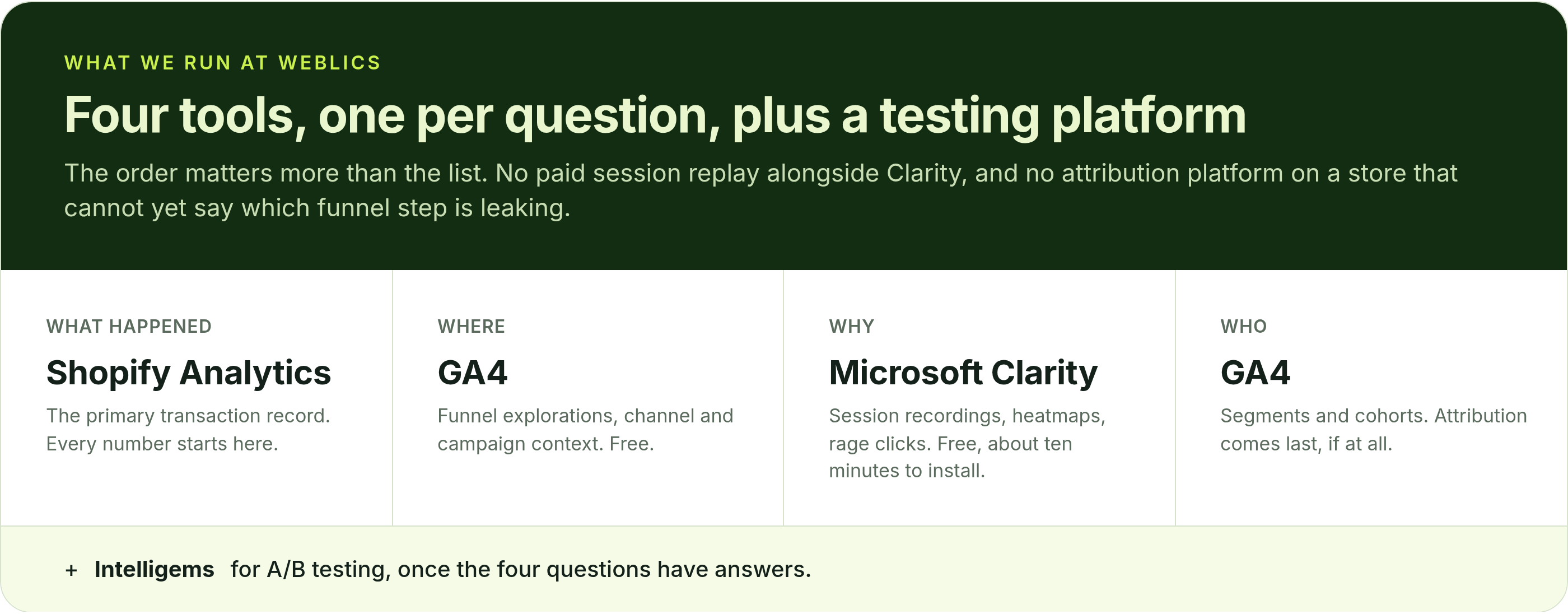
At Weblics the stack is Shopify Analytics, GA4, Microsoft Clarity and Intelligems for A/B testing. One tool per question plus a testing platform. The full argument for that order is in our guide to running a Shopify CRO audit.
Every plan includes complete care-driven CRO - what varies is testing capacity and analysis depth.
All Plans Include:
Onboarding (First 5 days):
- Founder interviews & business deep-dive
- Comprehensive technical website audit
- Customer psychology analysis (ICP, 5 WHYs, SWOT)
- AI-trained buyer personas creation
- Ad creatives audit
- Marketing ecosystem review
Ongoing (Continuous):
- Psychology-first hypothesis generation
- Conversion-focused UX/UI design
- Strategic copywriting
- Shopify development & implementation
- A/B testing & QA
- Transparent reporting & documentation
- Strategy meetings (weekly or bi-weekly)
What Changes by Tier:
- Tests per month: 2, 4, 6, or 8 A/B tests
- Meeting frequency: Bi-weekly (Starter) or Weekly (Growth+)
- Analysis depth: Post-purchase surveys, support analysis, inventory strategy, KPI planning, quarterly planning (varies by tier)
Bonus (Growth+): Comprehensive email marketing audit from specialist partners
Flexible plans give you complete control over costs. You pay for the essential CRO work - strategy, hypothesis generation, analysis, A/B test and project management - whilst design, development, and QA are billed separately at $70/hourly only when you need them.
This is perfect if you have an in-house design or development team, or if you want to manage exactly what gets built and when. You're not locked into paying for services you don't need.
Scale plans include everything - strategy, analysis, design, development, QA, and implementation - in one predictable monthly retainer. No surprises, no separate invoices, just complete care-driven CRO delivered autonomously.
Choose Flexible if: You have internal resources or want precise cost control
Choose Scale if: You want fully autonomous, hands-off CRO with everything included
Transparent pricing based on your monthly traffic.
We charge based on traffic volume because testing capacity and statistical significance directly correlate with session count. The more traffic you have, the faster we can run tests and deliver results.
Pricing:
- Starter (50K-75K sessions): $1,650/mo - 2 tests
- Growth (75K-150K sessions): $3,500/mo - 4 tests
- Scale (150K-350K sessions): $6,600/mo - 6 tests
- Enterprise (350K+ sessions): $10,700/mo - 8 tests
No long-term contracts. Cancel anytime.
Every plan includes our 30-day profitability guarantee.
Not sure which plan fits?
Book a discovery call - I'll help you find the perfect match for your business.
Our battle-tested frameworks and systems validate every hypothesis before we build.
Phase 1: Onboarding (First 5 days)
- Deep-dive into your business, customers, and psychology
- Comprehensive technical audit
- 25+ care-driven optimisation hypotheses
- Custom roadmap delivered
Phase 2: Operational (Continuous)
- Validate hypotheses through AI-trained buyer personas
- Ask: "Does this genuinely serve customer needs - not manipulate?"
- Design, develop, and implement winning tests
- Rigorous QA across all devices
- Launch and monitor
Phase 3: Ongoing Analysis (Monthly)
- Behavioural segmentation & data analysis
- Post-purchase survey analysis (Growth+ plans)
- Support ticket insights analysis (Growth+ plans)
- Inventory strategy (Growth+ plans)
- Monthly KPI planning (Growth+ plans)
- Quarterly strategic planning (Scale+ plans)
Yes - but as an addition to our battle-tested frameworks, not the foundation.
We've built a proprietary AI system that validates every hypothesis against your actual buyer personas before we build anything. This ensures we only create optimisations your customers will genuinely respond to.
How it works:
- Our frameworks identify conversion opportunities
- We generate psychology-first hypotheses
- AI-trained buyer personas validate each hypothesis
- We ask: "Does this genuinely serve customer needs—not manipulate?"
- Only validated hypotheses get built and tested
This approach achieves 84% test success rate vs 45% industry average - because we validate with your actual customers before building, not after.
AI enhances our care-driven methodology. It doesn't replace genuine customer understanding.
Simply upgrade to the next tier for more included tests and enhanced ongoing analysis.
We're completely flexible - scale up or down based on your business needs. No penalties, no long-term lock-ins.
Want to discuss expanding your plan? Your dedicated CRO manager can adjust your package anytime.
Yes. No long-term contracts. Cancel anytime.
We earn your business every single month through results - not by trapping you in contracts.
If we don't make you profitable within 30 days, you pay nothing more until we deliver. That's our guarantee.
Most clients stay because care-driven CRO compounds month after month - each winning test keeps generating revenue whilst new tests add even more. But you're never locked in.
We're confident our results will speak for themselves.
Zero micromanagement required. We operate completely autonomously.
We're an extension of your business - making decisions with your profit margins AND mission in mind, not billable hours.
Your involvement:
- Initial onboarding: 2-3 hours (interviews, strategy alignment)
- Weekly/bi-weekly meetings: 30-60 minutes (strategy updates, results review)
- Ad-hoc questions: Slack chat for quick questions
We handle everything else:
- Hypothesis generation
- Design and copywriting
- Development and implementation
- QA across all devices
- A/B test management
- Data analysis and reporting
You focus on running your business. We focus on adding $50K+ monthly to your revenue.
That's the partnership.
We integrate with your existing tools—no forced changes.
Analytics: Shopify Analytics, Microsoft Clarity, GA4
Testing: Intelligems
Management: ClickUp, Figma, Slack
Your data stays in your systems. We integrate seamlessly.
We sign NDAs before any work begins. Your data is protected - always.
Security measures:
- Non-Disclosure Agreement (NDA) signed upfront
- Limited access permissions (only what's necessary)
- Data stored in your systems (we don't migrate your data)
- Team access restricted to assigned personnel only
- Regular security audits
We treat your business like our own - that includes protecting your data like it's our own.
You maintain full control over all access permissions and can revoke them anytime.
Guaranteed profitability in 30 days. $50K+ monthly revenue boost within 60 days.
Tangible outcomes:
But more than numbers - you'll understand your customers deeply, remove friction authentically, and build genuine relationships that compound revenue month after month.
- Increased conversion rates (50-100%+ improvements common)
- Higher average order values
- Improved ROAS (return on ad spend)
- Enhanced customer lifetime value
- Sustainable, compounding revenue growth
Our 84% hypothesis success rate means tests consistently work.
Real client results:
- ForKeeps Merch: $2.3M added revenue (+70% conversion rate)
- Organic Muscle: 128% conversion rate increase
- CKitchen: $1.1M added revenue over 22 months
- Mayven Studios: 50% conversion increase in 2 months
For as long as care-driven CRO continues delivering massive ROI - which typically compounds over 6+ months.
Why long-term partnerships work:
- Each winning test keeps generating revenue permanently
- New tests stack on top of previous wins
- Deeper customer understanding leads to better hypotheses
- Compounding effects multiply over time
Typical timeline:
- Months 1-3: Foundation + initial wins ($50K+ monthly added)
- Months 4-6: Compounding effects visible (wins multiply)
- Months 7-12: Sustainable growth system established
- 12+ months: Category-leading conversion rates achieved
Most clients stay 12-24+ months because results compound. But there's no lock-in - cancel anytime.
We earn your business every month through genuine results, not contracts.
Three simple steps:
Step 1: Book a Discovery Call 30-minute conversation to discuss your traffic, goals, and biggest challenges. We'll explore if we're a good fit and map out your path to $50K+ monthly revenue growth.
Step 2: Get Your Free Audit We'll conduct a comprehensive CRO audit of your website, deliver 25+ psychology-first hypotheses, and show you exactly where your biggest revenue opportunities are.
Step 3: Choose Your Plan & Launch Select the plan that fits your traffic and business needs. We'll onboard you within 5 days and have your first A/B test live within 10 days.
Ready to grow with care-driven CRO?
Or have more questions? Email us: garyk@weblics.agency

Spending more on

Getting less back?
Your ads aren't broken. The store they land on is.
Send us your URL and we'll show you which leaks are eating your ad spend, and which one to fix first.

Just honest findings on your store, within 48h.