


How to Run a Shopify Conversion Audit That Actually Finds Leaks
This guide gives you the exact framework we use, stage by stage, with the patterns we see in 80% of stores. The free shopify audit template at the end is the same one our team fills out for paying clients.
Why Most Shopify Website Audit Checklists Fail
A real cro audit checklist works the other way around. It is short, structured, and tied to specific places in your funnel where money actually leaks. Think of it like a plumber walking through your house. They don't inspect every screw on every fitting. They check the 6 spots that fail in 80% of houses, then fix those first.
That is also how we run a Shopify conversion audit. We move stage by stage from the top of the funnel to the thank-you page, and we score each stage against the patterns we see across hundreds of stores. The goal is simple: find the biggest leak first, fix it, then move down the list.
The data backs this up. Research from the Baymard Institute suggests that large ecommerce sites may improve conversion rates by as much as 35% through checkout design improvements alone. That is one stage out of seven. Imagine what stacking wins across all seven does to revenue.
The 7-Stage CRO Audit Framework Explained
Here is how the seven stages map to the customer journey and the data sources you need to check each one. This is the spine of every shopify ecommerce audit we run.
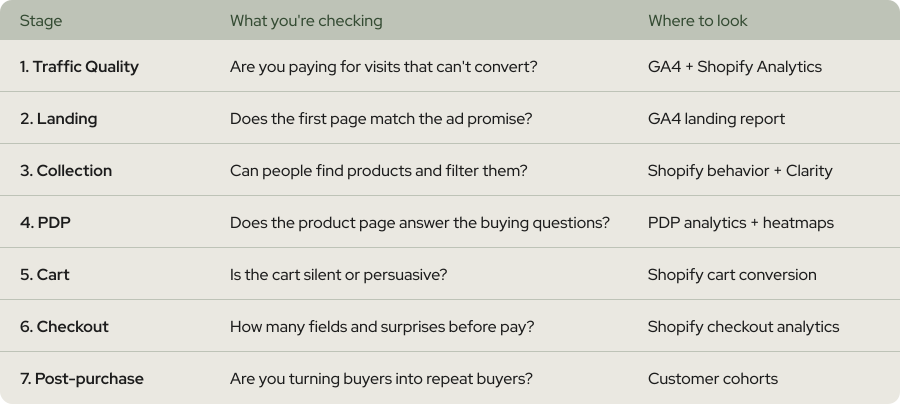
Run the stages in order, top to bottom. There is a reason for that. The biggest funnel leak is cart-to-checkout (50-60% drop), not checkout abandonment, but a leak earlier in the funnel poisons everything downstream. If your traffic is wrong, your PDP can't save you. Fix in order.
How long should a Shopify CRO audit take?
Stage 1 - Traffic Quality Audit
Open Shopify Analytics and segment your sessions by source, device, and landing page. You are looking for three patterns:
1. Channels with high traffic and a conversion rate under 1%. These are usually broad paid social campaigns sending cold, low-intent visitors. As stores invest in broader acquisition - paid social, influencer partnerships, PR, top-of-funnel content - they bring in larger audiences who are earlier in the buying journey.
2. Mobile traffic massively underperforming desktop. The average mobile conversion rate for Shopify stores is 1.2%, while desktop conversion rates stand at 1.9%. If your gap is bigger than 2x, that is a UX issue, not a traffic issue.
3. Landing pages that get loads of sessions but zero add-to-cart events. That is a message-match leak. The ad promised one thing, the page delivers another.
The benchmark to anchor against: The Shopify platform average conversion rate sits at approximately 1.4% as of 2026. If your overall rate is below that, your traffic quality is almost certainly part of the problem. If you are above it but want to push higher, drill into the channel-level numbers.
Think of traffic quality like the bouncer at a club. Let the wrong people in and the rest of the night is wasted, no matter how good the music is.
Stage 2 to 3 - Landing and Collection Pages
Landing page audit checks
1. Does the H1 match the ad headline?
2. Does the hero image show the product, not a lifestyle scene?
3. Is there a clear primary CTA above the fold?
4. Does the page load in under 2 seconds on mobile?
The last point matters more than people realise. Each second of delay can reduce conversions by 7-10%. If your landing page is at 4 seconds, you are leaking before the visitor even sees your offer.
Collection page audit checks
1. Are filters available for size, colour, price, and key product attributes?
2. Do products show review stars on the collection card?
3. Is there a clear sort order, or is it random?
4. Does the page show 12 to 24 products, not 60 (which kills mobile load time)?
Think of a collection page like the produce aisle in a supermarket. You don't read every label. You scan, filter by what you need, and grab. If your filters are buried or missing, shoppers leave.
Stage 4 to 5 - PDP and Cart Audit
PDP leaks we see in 80% of stores
1. No clear hierarchy. Title, price, reviews, and add-to-cart should be visible without scrolling on mobile. They almost never are.
2. Generic product descriptions. Bullet points pulled from the manufacturer site, no benefit framing, no buyer questions answered.
3. Reviews under 50 in count, or hidden in a tab. Stores with 50+ reviews see 15% higher conversion rates. Reviews need to be visible, not tabbed away.
4. Shipping cost not visible. This is the single biggest checkout-stage leak, and it starts on the PDP.
The shipping point deserves emphasis. Extra costs like shipping (39%), required account creation (24%), slow delivery (21%), didn't trust site with card info (19%), checkout too complicated (18%) are the top abandonment drivers. Show shipping early. Show it on the PDP if you can.
A good benchmark for the front of the funnel: The average Add-to-Cart (ATC) rate is about 7.52%. If yours is below 4%, your PDP is leaking. If it is above 10%, your PDP is working but your cart and checkout might not be.
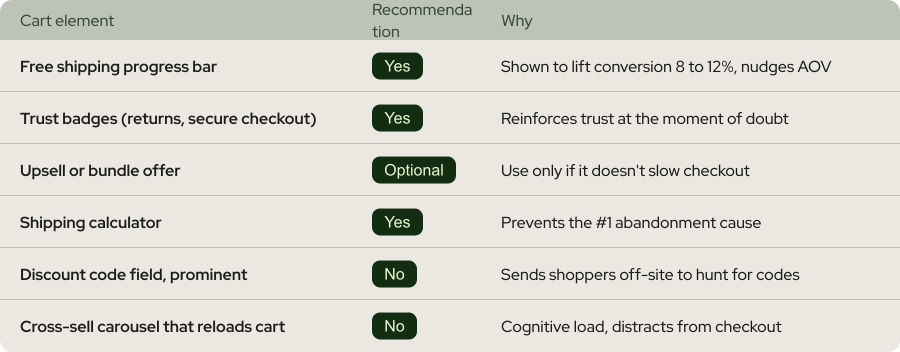
Cart audit checks
Stage 6 to 7 - Checkout and Post-purchase Leaks
Shopify's checkout is more standardised than custom builds, which is good news. But there are still leaks you control.
Checkout audit checks
2. Guest checkout enabled. Forced account creation is a major abandonment driver.
3. Shop Pay and digital wallets enabled. Apple Pay, Google Pay, and Shop Pay shave seconds off checkout and improve mobile conversion.
4. Express checkout above the standard form. Mobile shoppers want one-tap.
5. Shipping and tax visible before payment. Surprises at this stage are conversion killers.
6. Post-purchase upsell active. Free revenue. Shopify has it built in.
Run a "speed test" on yourself. Time how long it takes you to go from add-to-cart to order confirmation as a guest on mobile. Anything over 90 seconds is too long.
Post-purchase audit checks
Three checks for the post-purchase stage:
1. Is there a one-click upsell on the thank-you page?
2. Does the order confirmation email arrive within 60 seconds?
3. Is there a clear "what happens next" timeline so customers don't email support asking?
Think of post-purchase like the end credits of a great film. Most people leave too early and miss the bonus scene. The bonus scene is where repeat purchase rate gets built.
How to Use the Free Shopify Audit Template
Here is the workflow we follow on every new client:
1. Block 2 to 3 hours. No interruptions. Open Shopify Analytics, GA4, and the template in three tabs.
2. Work top to bottom. Stage 1 first, Stage 7 last. Don't skip ahead.
3. Score every stage red, yellow, or green. Use the patterns described above.
4. Stack rank the reds by impact. Biggest leak first.
5. Write three test hypotheses for the top red. Each hypothesis goes into a testing roadmap.
A good first audit should leave you with 3 to 5 specific things to fix or test. Not a 50-item to-do list. Five concrete bets you can run in the next 60 days.
The template also includes a "leak frequency" column with the percentage of stores we've seen each pattern in. Use it to calibrate. If a leak shows up in 80%+ of stores and you haven't fixed it, fix it before your competitor does.

.webp)
.webp)
.webp)
.webp)
.webp)
.webp)




Not Sure Where Your Store Is Leaking Revenue?
Get a free CRO or Google Ads audit from our team — we'll find what's killing your conversions and show you exactly how to fix it. No pitch, no pressure.
Get a free CRO or Google Ads audit from our team


Do you have any questions left?
Here are the answers for you
A first-pass shopify cro audit takes 2 to 3 hours if you have GA4 connected and 30 days of clean data. A deep audit with session recordings, heatmaps, and a customer survey takes around 20 hours. Both follow the same 7-stage spine, so you can start with the short version and upgrade later if you find serious red flags.
Not quite. A shopify website audit usually covers SEO, speed, design, and CRO at a high level. A cro audit goes deeper on conversion specifically and ties every finding to a stage in the funnel. If you have to pick one, start with the cro audit. It pays for itself faster.
Shopify Analytics covers about 70% of what you need. GA4 fills the rest, especially for landing page and channel-level data. If you don't have GA4 yet, install it before you audit. Without it, the traffic quality stage is mostly guesswork.
Then your audit becomes about pushing into the top 20%, not catching up. The same 7-stage framework still applies, but you'll find smaller, more specific leaks. Top stores still have leaks. They just hide better.
You can, but with caveats. New stores often don't have enough sessions for the data to be meaningful. Wait until you have at least 500 sessions over 30 days before scoring stages by analytics. Until then, run a heuristic audit (UX, copy, trust signals) with the same template.
When you've run the free template, found 3+ red stages, and don't have the bandwidth to test fixes. An agency audit also helps when you need an outside view on bigger structural issues, like positioning or PDP architecture. We offer a free first-pass shopify cro audit at weblics.agency if you want a second pair of eyes.
Every plan includes complete care-driven CRO - what varies is testing capacity and analysis depth.
All Plans Include:
Onboarding (First 5 days):
- Founder interviews & business deep-dive
- Comprehensive technical website audit
- Customer psychology analysis (ICP, 5 WHYs, SWOT)
- AI-trained buyer personas creation
- Ad creatives audit
- Marketing ecosystem review
Ongoing (Continuous):
- Psychology-first hypothesis generation
- Conversion-focused UX/UI design
- Strategic copywriting
- Shopify development & implementation
- A/B testing & QA
- Transparent reporting & documentation
- Strategy meetings (weekly or bi-weekly)
What Changes by Tier:
- Tests per month: 2, 4, 6, or 8 A/B tests
- Meeting frequency: Bi-weekly (Starter) or Weekly (Growth+)
- Analysis depth: Post-purchase surveys, support analysis, inventory strategy, KPI planning, quarterly planning (varies by tier)
Bonus (Growth+): Comprehensive email marketing audit from specialist partners
Flexible plans give you complete control over costs. You pay for the essential CRO work - strategy, hypothesis generation, analysis, A/B test and project management - whilst design, development, and QA are billed separately at $70/hourly only when you need them.
This is perfect if you have an in-house design or development team, or if you want to manage exactly what gets built and when. You're not locked into paying for services you don't need.
Scale plans include everything - strategy, analysis, design, development, QA, and implementation - in one predictable monthly retainer. No surprises, no separate invoices, just complete care-driven CRO delivered autonomously.
Choose Flexible if: You have internal resources or want precise cost control
Choose Scale if: You want fully autonomous, hands-off CRO with everything included
Transparent pricing based on your monthly traffic.
We charge based on traffic volume because testing capacity and statistical significance directly correlate with session count. The more traffic you have, the faster we can run tests and deliver results.
Pricing:
- Starter (50K-75K sessions): $1,650/mo - 2 tests
- Growth (75K-150K sessions): $3,500/mo - 4 tests
- Scale (150K-350K sessions): $6,600/mo - 6 tests
- Enterprise (350K+ sessions): $10,700/mo - 8 tests
No long-term contracts. Cancel anytime.
Every plan includes our 30-day profitability guarantee.
Not sure which plan fits?
Book a discovery call - I'll help you find the perfect match for your business.
Our battle-tested frameworks and systems validate every hypothesis before we build.
Phase 1: Onboarding (First 5 days)
- Deep-dive into your business, customers, and psychology
- Comprehensive technical audit
- 25+ care-driven optimisation hypotheses
- Custom roadmap delivered
Phase 2: Operational (Continuous)
- Validate hypotheses through AI-trained buyer personas
- Ask: "Does this genuinely serve customer needs - not manipulate?"
- Design, develop, and implement winning tests
- Rigorous QA across all devices
- Launch and monitor
Phase 3: Ongoing Analysis (Monthly)
- Behavioural segmentation & data analysis
- Post-purchase survey analysis (Growth+ plans)
- Support ticket insights analysis (Growth+ plans)
- Inventory strategy (Growth+ plans)
- Monthly KPI planning (Growth+ plans)
- Quarterly strategic planning (Scale+ plans)
Yes - but as an addition to our battle-tested frameworks, not the foundation.
We've built a proprietary AI system that validates every hypothesis against your actual buyer personas before we build anything. This ensures we only create optimisations your customers will genuinely respond to.
How it works:
- Our frameworks identify conversion opportunities
- We generate psychology-first hypotheses
- AI-trained buyer personas validate each hypothesis
- We ask: "Does this genuinely serve customer needs—not manipulate?"
- Only validated hypotheses get built and tested
This approach achieves 84% test success rate vs 45% industry average - because we validate with your actual customers before building, not after.
AI enhances our care-driven methodology. It doesn't replace genuine customer understanding.
Simply upgrade to the next tier for more included tests and enhanced ongoing analysis.
We're completely flexible - scale up or down based on your business needs. No penalties, no long-term lock-ins.
Want to discuss expanding your plan? Your dedicated CRO manager can adjust your package anytime.
Yes. No long-term contracts. Cancel anytime.
We earn your business every single month through results - not by trapping you in contracts.
If we don't make you profitable within 30 days, you pay nothing more until we deliver. That's our guarantee.
Most clients stay because care-driven CRO compounds month after month - each winning test keeps generating revenue whilst new tests add even more. But you're never locked in.
We're confident our results will speak for themselves.
Zero micromanagement required. We operate completely autonomously.
We're an extension of your business - making decisions with your profit margins AND mission in mind, not billable hours.
Your involvement:
- Initial onboarding: 2-3 hours (interviews, strategy alignment)
- Weekly/bi-weekly meetings: 30-60 minutes (strategy updates, results review)
- Ad-hoc questions: Slack chat for quick questions
We handle everything else:
- Hypothesis generation
- Design and copywriting
- Development and implementation
- QA across all devices
- A/B test management
- Data analysis and reporting
You focus on running your business. We focus on adding $50K+ monthly to your revenue.
That's the partnership.
We integrate with your existing tools—no forced changes.
Analytics: Shopify Analytics, Microsoft Clarity, GA4
Testing: Intelligems
Management: ClickUp, Figma, Slack
Your data stays in your systems. We integrate seamlessly.
We sign NDAs before any work begins. Your data is protected - always.
Security measures:
- Non-Disclosure Agreement (NDA) signed upfront
- Limited access permissions (only what's necessary)
- Data stored in your systems (we don't migrate your data)
- Team access restricted to assigned personnel only
- Regular security audits
We treat your business like our own - that includes protecting your data like it's our own.
You maintain full control over all access permissions and can revoke them anytime.
Guaranteed profitability in 30 days. $50K+ monthly revenue boost within 60 days.
Tangible outcomes:
But more than numbers - you'll understand your customers deeply, remove friction authentically, and build genuine relationships that compound revenue month after month.
- Increased conversion rates (50-100%+ improvements common)
- Higher average order values
- Improved ROAS (return on ad spend)
- Enhanced customer lifetime value
- Sustainable, compounding revenue growth
Our 84% hypothesis success rate means tests consistently work.
Real client results:
- ForKeeps Merch: $2.3M added revenue (+70% conversion rate)
- Organic Muscle: 128% conversion rate increase
- CKitchen: $1.1M added revenue over 22 months
- Mayven Studios: 50% conversion increase in 2 months
For as long as care-driven CRO continues delivering massive ROI - which typically compounds over 6+ months.
Why long-term partnerships work:
- Each winning test keeps generating revenue permanently
- New tests stack on top of previous wins
- Deeper customer understanding leads to better hypotheses
- Compounding effects multiply over time
Typical timeline:
- Months 1-3: Foundation + initial wins ($50K+ monthly added)
- Months 4-6: Compounding effects visible (wins multiply)
- Months 7-12: Sustainable growth system established
- 12+ months: Category-leading conversion rates achieved
Most clients stay 12-24+ months because results compound. But there's no lock-in - cancel anytime.
We earn your business every month through genuine results, not contracts.
Three simple steps:
Step 1: Book a Discovery Call 30-minute conversation to discuss your traffic, goals, and biggest challenges. We'll explore if we're a good fit and map out your path to $50K+ monthly revenue growth.
Step 2: Get Your Free Audit We'll conduct a comprehensive CRO audit of your website, deliver 25+ psychology-first hypotheses, and show you exactly where your biggest revenue opportunities are.
Step 3: Choose Your Plan & Launch Select the plan that fits your traffic and business needs. We'll onboard you within 5 days and have your first A/B test live within 10 days.
Ready to grow with care-driven CRO?
Or have more questions? Email us: garyk@weblics.agency

Wait… Claim your free bonuses
Find out exactly where your store is leaking revenue — and where your ad spend is going to waste. No pitch, just data.
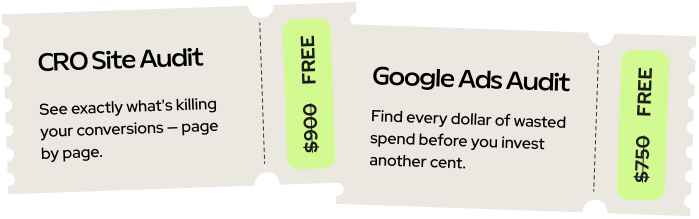
Just honest findings delivered within 2 business days.