


Shopify Collaborator Request Code:
How to Find, Share & Manage It
What is a Shopify collaborator request code?
When an agency, freelance developer, or app support team wants to work inside your Shopify admin, they need a Shopify Partner account. After creating one, they can send you an access request — but only if they either know your code, or your store is set to allow open requests.
Critically: sharing the code does not grant access automatically. It only allows the person to send you a request. You still review and approve it manually, and you set exactly which sections of your store they can see.
Where to find your Shopify collaborator request code
- Navigate to your Shopify store Admin → Settings → Users and permissions
- Scroll down to the section Collaborators, and there's your code
- Copy the code using the icon and share it with the desired person
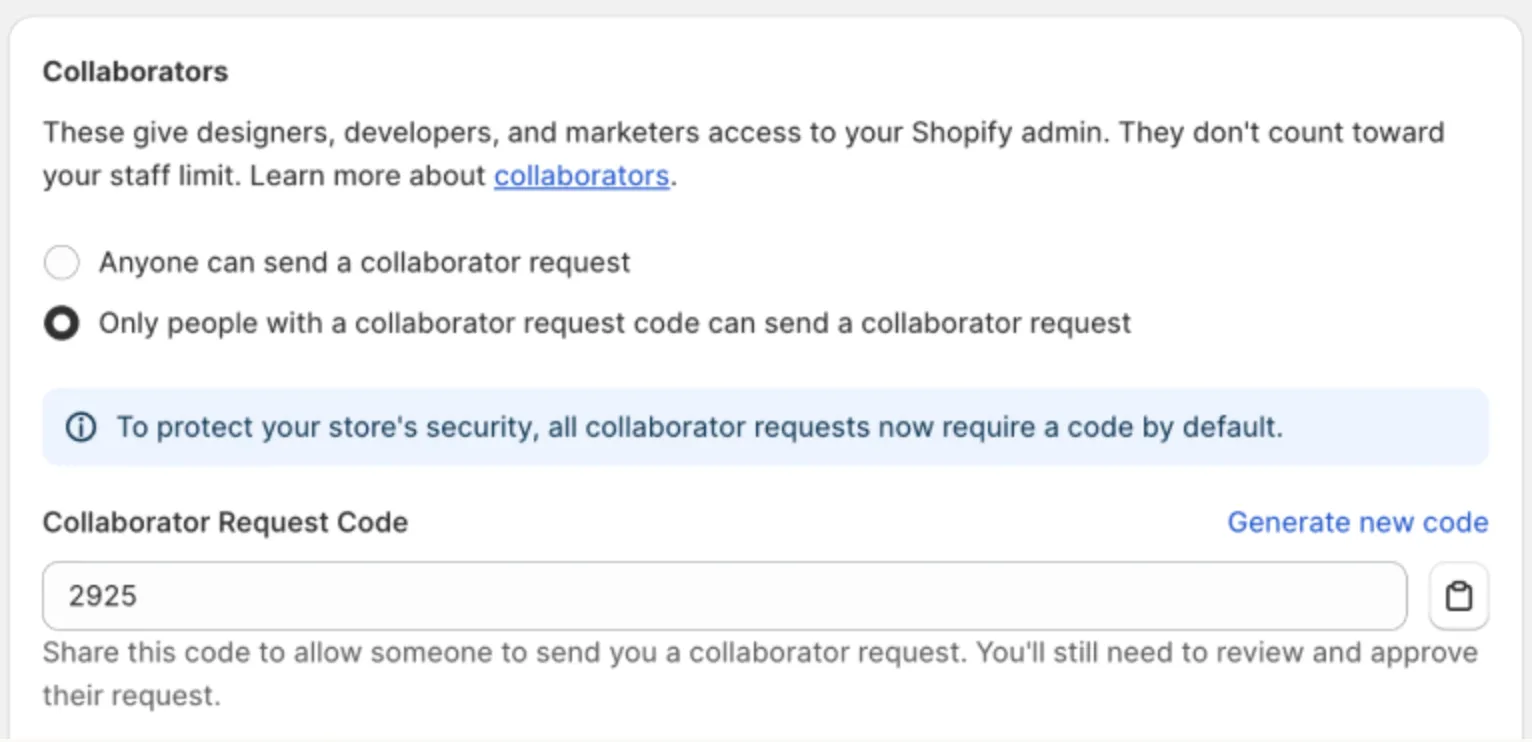
Can I change the code?
How to enable or disable the code requirement
- Go to Settings → Users and permissions → Collaborators
- Scroll down to the section Collaborators and choose between "Anyone can send a collaborator request" and "Only people with a collaborator request code can send a collaborator request"
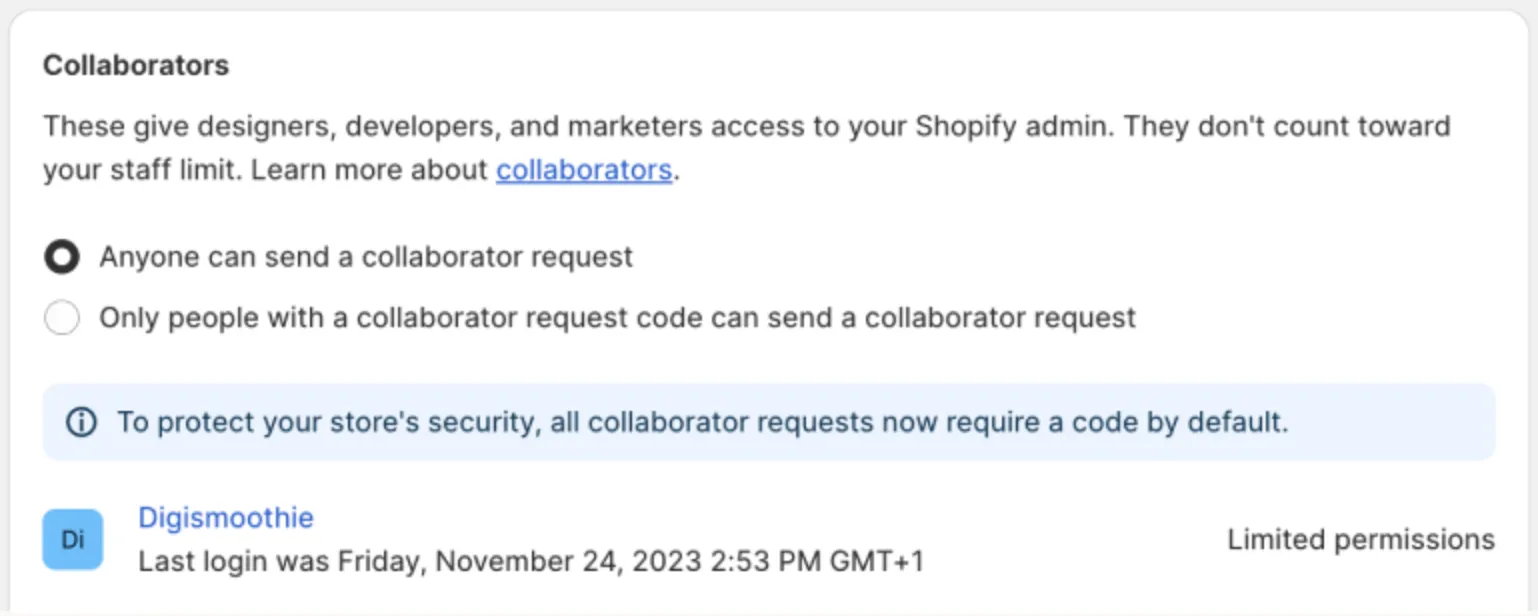
The one exception: if you work with many different agencies or freelancers simultaneously and find the code-sharing step adds friction, open requests can streamline onboarding — just make sure you're reviewing and approving each request carefully before granting access.
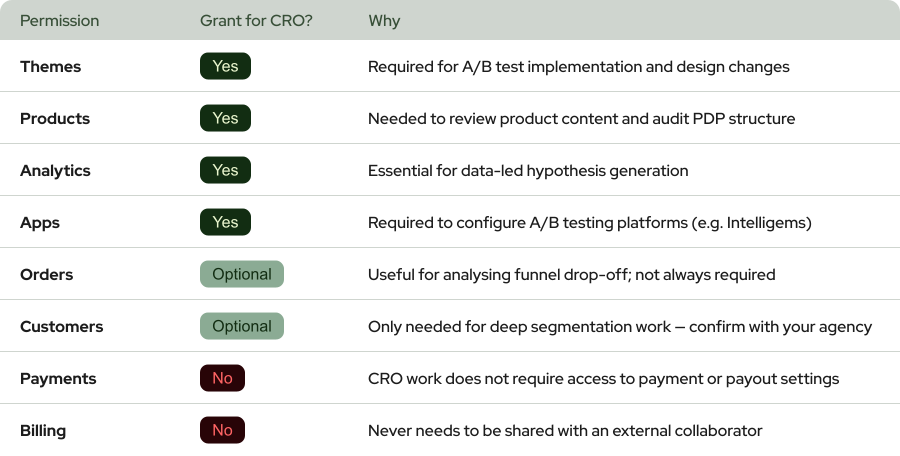
What permissions to grant a CRO agency or developer
Here's a reference table for a typical Shopify CRO engagement:
Security best practices for collaborator access
Rotate your code after ending an engagement
Review active collaborators regularly
Never share your code over public channels
Match permissions to the actual scope of work
Worth a Read


 Any questions? Let’s chat
Do you have any questions left?
Here are the answers for you
A good Shopify conversion rate ranges from 2.5% to 3.5% for most DTC ecommerce stores. However, this varies significantly by product category, price point, and traffic source. A store selling $20 impulse-buy products from social media traffic will naturally convert higher than a $500 luxury goods store getting organic search traffic. Focus on improving your own baseline by 0.3-0.5% at a time rather than chasing an arbitrary benchmark.
Most Shopify stores see measurable improvements within 30-60 days of implementing data-backed changes. Quick wins - like fixing page speed, adding trust badges, or streamlining checkout - can show results in under two weeks. Deeper optimizations based on A/B testing typically need 2-4 weeks per test to reach statistical significance, with compounding gains over 3-6 months.
It can, but not always. A theme switch improves conversions when your current theme is slow, poorly structured for mobile, or lacks modern features like section-based product pages. Simply swapping to a "prettier" theme without addressing the underlying UX and copy issues won't move the needle. Theme migrations work best when paired with intentional CRO improvements to layout, content structure, and page speed.
You can absolutely start optimizing on your own - and should. The strategies in this guide are DIY-friendly. However, an experienced Shopify CRO agency adds value when you need rigorous A/B testing infrastructure, statistical analysis expertise, and a systematic testing roadmap. Agencies like Weblics run 10-20 concurrent experiments with proper controls, which is hard to replicate in-house without dedicated resources. The ROI question is simple: if the agency generates more incremental revenue than their fee, it pays for itself.
A sub-1% conversion rate usually signals one of three problems: your traffic quality is poor (visitors aren't your target audience), your product-market fit messaging is off (visitors don't immediately understand why they should buy), or there's a major technical friction point (slow speed, broken mobile experience, checkout errors). Start by checking your analytics for device-specific conversion rates. If mobile converts dramatically lower than desktop, you likely have a mobile UX issue. If both are low, revisit your traffic sources and product page messaging.
Almost always improve conversion rate first. Here's why: if your store converts at 1% and you double your traffic, you get 2x the sales. But if you improve your conversion rate to 2% at your current traffic level, you also get 2x the sales - without spending more on ads. The math is the same, but the CRO path is cheaper, faster, and makes every future dollar of ad spend more efficient. Fix the leaky bucket before you pour more water into it.
Every plan includes complete care-driven CRO - what varies is testing capacity and analysis depth.
All Plans Include:
Onboarding (First 5 days):
- Founder interviews & business deep-dive
- Comprehensive technical website audit
- Customer psychology analysis (ICP, 5 WHYs, SWOT)
- AI-trained buyer personas creation
- Ad creatives audit
- Marketing ecosystem review
Ongoing (Continuous):
- Psychology-first hypothesis generation
- Conversion-focused UX/UI design
- Strategic copywriting
- Shopify development & implementation
- A/B testing & QA
- Transparent reporting & documentation
- Strategy meetings (weekly or bi-weekly)
What Changes by Tier:
- Tests per month: 2, 4, 6, or 8 A/B tests
- Meeting frequency: Bi-weekly (Starter) or Weekly (Growth+)
- Analysis depth: Post-purchase surveys, support analysis, inventory strategy, KPI planning, quarterly planning (varies by tier)
Bonus (Growth+): Comprehensive email marketing audit from specialist partners
Flexible plans give you complete control over costs. You pay for the essential CRO work - strategy, hypothesis generation, analysis, A/B test and project management - whilst design, development, and QA are billed separately at $70/hourly only when you need them.
This is perfect if you have an in-house design or development team, or if you want to manage exactly what gets built and when. You're not locked into paying for services you don't need.
Scale plans include everything - strategy, analysis, design, development, QA, and implementation - in one predictable monthly retainer. No surprises, no separate invoices, just complete care-driven CRO delivered autonomously.
Choose Flexible if: You have internal resources or want precise cost control
Choose Scale if: You want fully autonomous, hands-off CRO with everything included
Transparent pricing based on your monthly traffic.
We charge based on traffic volume because testing capacity and statistical significance directly correlate with session count. The more traffic you have, the faster we can run tests and deliver results.
Pricing:
- Starter (50K-75K sessions): $1,650/mo - 2 tests
- Growth (75K-150K sessions): $3,500/mo - 4 tests
- Scale (150K-350K sessions): $6,600/mo - 6 tests
- Enterprise (350K+ sessions): $10,700/mo - 8 tests
No long-term contracts. Cancel anytime.
Every plan includes our 30-day profitability guarantee.
Not sure which plan fits?
Book a discovery call - I'll help you find the perfect match for your business.
Our battle-tested frameworks and systems validate every hypothesis before we build.
Phase 1: Onboarding (First 5 days)
- Deep-dive into your business, customers, and psychology
- Comprehensive technical audit
- 25+ care-driven optimisation hypotheses
- Custom roadmap delivered
Phase 2: Operational (Continuous)
- Validate hypotheses through AI-trained buyer personas
- Ask: "Does this genuinely serve customer needs - not manipulate?"
- Design, develop, and implement winning tests
- Rigorous QA across all devices
- Launch and monitor
Phase 3: Ongoing Analysis (Monthly)
- Behavioural segmentation & data analysis
- Post-purchase survey analysis (Growth+ plans)
- Support ticket insights analysis (Growth+ plans)
- Inventory strategy (Growth+ plans)
- Monthly KPI planning (Growth+ plans)
- Quarterly strategic planning (Scale+ plans)
Yes - but as an addition to our battle-tested frameworks, not the foundation.
We've built a proprietary AI system that validates every hypothesis against your actual buyer personas before we build anything. This ensures we only create optimisations your customers will genuinely respond to.
How it works:
- Our frameworks identify conversion opportunities
- We generate psychology-first hypotheses
- AI-trained buyer personas validate each hypothesis
- We ask: "Does this genuinely serve customer needs—not manipulate?"
- Only validated hypotheses get built and tested
This approach achieves 84% test success rate vs 45% industry average - because we validate with your actual customers before building, not after.
AI enhances our care-driven methodology. It doesn't replace genuine customer understanding.
Simply upgrade to the next tier for more included tests and enhanced ongoing analysis.
We're completely flexible - scale up or down based on your business needs. No penalties, no long-term lock-ins.
Want to discuss expanding your plan? Your dedicated CRO manager can adjust your package anytime.
Yes. No long-term contracts. Cancel anytime.
We earn your business every single month through results - not by trapping you in contracts.
If we don't make you profitable within 30 days, you pay nothing more until we deliver. That's our guarantee.
Most clients stay because care-driven CRO compounds month after month - each winning test keeps generating revenue whilst new tests add even more. But you're never locked in.
We're confident our results will speak for themselves.
Zero micromanagement required. We operate completely autonomously.
We're an extension of your business - making decisions with your profit margins AND mission in mind, not billable hours.
Your involvement:
- Initial onboarding: 2-3 hours (interviews, strategy alignment)
- Weekly/bi-weekly meetings: 30-60 minutes (strategy updates, results review)
- Ad-hoc questions: Slack chat for quick questions
We handle everything else:
- Hypothesis generation
- Design and copywriting
- Development and implementation
- QA across all devices
- A/B test management
- Data analysis and reporting
You focus on running your business. We focus on adding $50K+ monthly to your revenue.
That's the partnership.
We integrate with your existing tools—no forced changes.
Analytics: Shopify Analytics, Microsoft Clarity, GA4
Testing: Intelligems
Management: ClickUp, Figma, Slack
Your data stays in your systems. We integrate seamlessly.
We sign NDAs before any work begins. Your data is protected - always.
Security measures:
- Non-Disclosure Agreement (NDA) signed upfront
- Limited access permissions (only what's necessary)
- Data stored in your systems (we don't migrate your data)
- Team access restricted to assigned personnel only
- Regular security audits
We treat your business like our own - that includes protecting your data like it's our own.
You maintain full control over all access permissions and can revoke them anytime.
Guaranteed profitability in 30 days. $50K+ monthly revenue boost within 60 days.
Tangible outcomes:
But more than numbers - you'll understand your customers deeply, remove friction authentically, and build genuine relationships that compound revenue month after month.
- Increased conversion rates (50-100%+ improvements common)
- Higher average order values
- Improved ROAS (return on ad spend)
- Enhanced customer lifetime value
- Sustainable, compounding revenue growth
Our 84% hypothesis success rate means tests consistently work.
Real client results:
- ForKeeps Merch: $2.3M added revenue (+70% conversion rate)
- Organic Muscle: 128% conversion rate increase
- CKitchen: $1.1M added revenue over 22 months
- Mayven Studios: 50% conversion increase in 2 months
For as long as care-driven CRO continues delivering massive ROI - which typically compounds over 6+ months.
Why long-term partnerships work:
- Each winning test keeps generating revenue permanently
- New tests stack on top of previous wins
- Deeper customer understanding leads to better hypotheses
- Compounding effects multiply over time
Typical timeline:
- Months 1-3: Foundation + initial wins ($50K+ monthly added)
- Months 4-6: Compounding effects visible (wins multiply)
- Months 7-12: Sustainable growth system established
- 12+ months: Category-leading conversion rates achieved
Most clients stay 12-24+ months because results compound. But there's no lock-in - cancel anytime.
We earn your business every month through genuine results, not contracts.
Three simple steps:
Step 1: Book a Discovery Call 30-minute conversation to discuss your traffic, goals, and biggest challenges. We'll explore if we're a good fit and map out your path to $50K+ monthly revenue growth.
Step 2: Get Your Free Audit We'll conduct a comprehensive CRO audit of your website, deliver 25+ psychology-first hypotheses, and show you exactly where your biggest revenue opportunities are.
Step 3: Choose Your Plan & Launch Select the plan that fits your traffic and business needs. We'll onboard you within 5 days and have your first A/B test live within 10 days.
Ready to grow with care-driven CRO?
Or have more questions? Email us: garyk@weblics.agency

Spending more on

Getting less back?
Your ads aren't broken. The store they land on is.
Send us your URL and we'll show you which leaks are eating your ad spend, and which one to fix first.

Just honest findings on your store, within 48h.