


Why Your Shopify Mobile CRO Strategy Is Underperforming (And How to Fix It)
Most operators treat mobile as a scaled-down version of their desktop site. It isn't. Mobile shoppers have different thumbs, different attention spans, different payment habits, and a completely different relationship with form fields. This guide shows you what's actually going wrong and which fixes move the revenue needle first.
- What a healthy mobile conversion rate looks like
- Why your low mobile conversion rate isn't a "mobile problem"
- Mobile site speed on Shopify: the LCP problem
- Mobile PDP best practices that actually move CR
- Mobile checkout optimisation: where the money leaks
- Mobile cart abandonment: the 3 silent killers
- The prioritised fix list, ranked by revenue impact
What a Healthy Mobile Conversion Rate Looks Like
Think of it like a restaurant with two entrances. The front door gets 70% of your foot traffic, but somehow only 40% of people who walk through it order food. You wouldn't shrug and say "that's just how front doors work". You'd go look at what's happening in the first 30 seconds after someone steps inside. Mobile is the same.
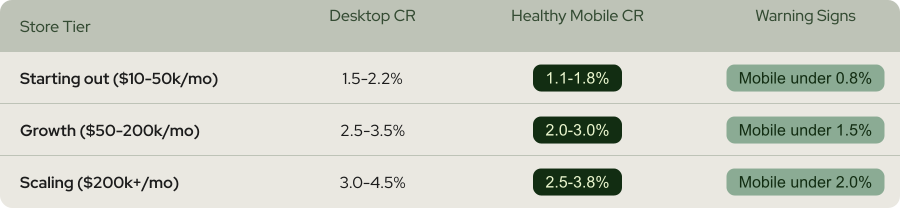
Here's a rough benchmark for Shopify stores based on what we see across audits:
Why Your Low Mobile Conversion Rate Isn't a "Mobile Problem"
Here's the mental model that changes everything: your desktop site is a showroom. Your mobile site is a vending machine. A showroom invites browsing. A vending machine needs to accept payment, dispense the product, and get out of the way. Most Shopify stores build beautiful showrooms and then squish them sideways for mobile.
The five things that actually cause low mobile conversion rate
2. Checkout forms that ask for too much information, too early, with the wrong keyboard
3. Sticky Add to Cart buttons that either don't exist or collide with browser UI
4. Payment wallets (Shop Pay, Apple Pay) placed below the fold or after the first form field
5. Product images that don't let users zoom properly with one hand
Notice what's not on that list: button colour, font choice, headline length. Those things matter, but they move the needle by 1-3%. The items above move it by 15-40%.
Mobile Site Speed on Shopify: The LCP Problem
The usual suspect is your product page hero image. Shopify themes love serving a 2400px-wide image to a phone that only needs 750px. The phone downloads the full file, resizes it in the browser, and by the time it renders, your visitor has already tabbed away to check Instagram.
How to actually fix mobile site speed on Shopify
1. Compress hero images and serve WebP. Use Shopify's built-in image optimisation or an app like Crush.pics. Target under 150KB for the first product image.
2. Preload the LCP image. Add <link rel="preload" as="image" href="..." fetchpriority="high"> in your theme's <head>. This alone often cuts LCP by 30-50%.
3. Defer third-party scripts. Every pixel, review widget, and chat tool adds 100-400ms. Audit them. Kill what's not earning its load time.
4. Turn on Shopify's native lazy loading for below-the-fold images. It's free and it works.
Mobile PDP Best Practices That Actually Move CR
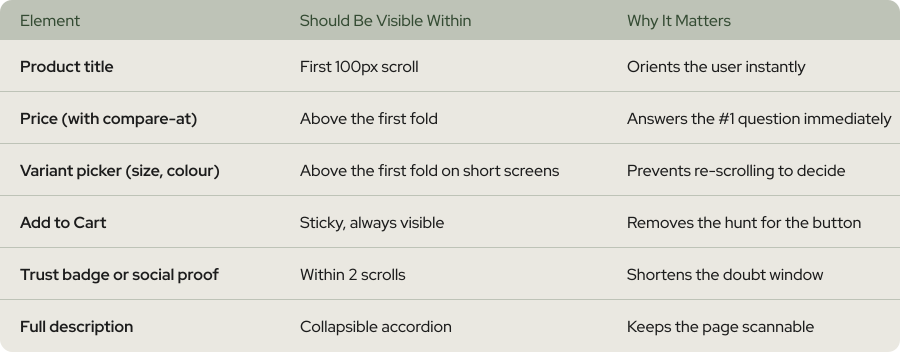
Imagine trying to order coffee from a menu where the prices are on page three and you have to walk back to the counter every time you want to change the size. That's what most Shopify mobile PDPs feel like. The product image eats the entire first screen, the variant picker is buried under a wall of description, and the Add to Cart button disappears the moment you scroll.
The mobile PDP checklist
Mobile Checkout Optimisation: Where the Money Leaks
Think of mobile checkout like airport security. Every step that isn't strictly necessary is a step that makes people give up and walk away. Nobody abandons a cart because the shipping options page was too pretty. They abandon because it took too long and felt annoying.
The three mobile checkout leaks, ranked
2. Buried payment wallets. Shop Pay, Apple Pay, and Google Pay should be the first thing the user sees on the checkout page, not the third. Shopify lets you control this via the checkout editor on Shopify Plus, and every growth-tier store should be using it.
3. Optional fields masquerading as required. Company name, second address line, "how did you hear about us" - kill them or mark them optional with lighter styling. Every extra field on mobile is a 3-7% drop in checkout completion.
Mobile Cart Abandonment: The Three Silent Killers
Picture this: a shopper is in the queue at a till, basket in hand. The cashier rings them up, then says "oh, and there's a £12 surcharge, and you'll need to make a loyalty account before I can take your card". Half the queue walks out. That's your mobile checkout right now if any of the three killers are active.
How to plug each cart abandonment leak
2. Enable guest checkout by default. Account creation after purchase converts 15-30% better than forced account creation before. Shopify makes this toggleable in Settings → Checkout.
3. Auto-apply discount codes from ad links. Don't make the user exit checkout to copy a code from their email. Use URL-based discounts (?discount=CODE) and a discount field that's collapsed by default so it doesn't scream "you should be looking for a coupon".
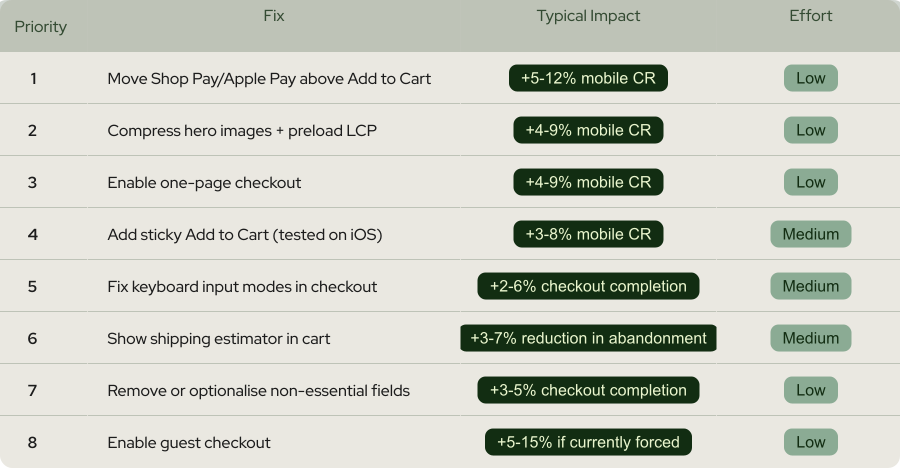
The Prioritised Fix List, Ranked by Revenue Impact
Mobile UX ecommerce is its own discipline. Treating it like "responsive desktop" is why your numbers look the way they do.
Worth a Read


 Any questions? Let’s chat
Do you have any questions left?
Here are the answers for you
A small gap is normal - around 15-30% lower on mobile than desktop. A 40-60% gap is not normal and signals specific issues in your mobile experience. Most Shopify stores with a big gap have a fixable combination of slow LCP, buried payment wallets, and form-heavy checkout. The gap is a diagnostic, not a destiny.
Move Shop Pay and Apple Pay above the regular Add to Cart button, and compress your hero images. Those two changes alone take a couple of hours and typically lift mobile CR by 8-18% combined. Everything else builds on top of that foundation.
Sometimes, but usually not entirely. Most Shopify 2.0 themes are technically capable of excellent mobile performance, but ship with default settings that prioritise aesthetics over speed. The issue is configuration and customisation, not the theme itself. Before you rebuild, audit what you already have.
Yes, but with caveats. Custom checkout extensions on Shopify Plus have their own set of quirks, especially around keyboard input modes and wallet placement. The principles (fewer fields, wallets first, fast loading) are universal, but the implementation details change. If you're on a third-party checkout solution, audit it against the priorities in this guide.
No. Most of the highest-impact fixes (image compression, sticky Add to Cart, Shop Pay placement, guest checkout) work on every Shopify plan. Shopify Plus gives you more control over the checkout itself, which matters once you're past $500k/month. Below that, the standard plan has plenty of levers to pull.
Technical fixes like image compression and checkout improvements show up in data within 7-14 days of shipping. Bigger UX changes (PDP redesign, checkout flow restructuring) need 4-6 weeks of testing to reach statistical significance. If you want this run properly, with prioritised tests and measured lifts, that's exactly what our Shopify CRO service handles end to end.
Every plan includes complete care-driven CRO - what varies is testing capacity and analysis depth.
All Plans Include:
Onboarding (First 5 days):
- Founder interviews & business deep-dive
- Comprehensive technical website audit
- Customer psychology analysis (ICP, 5 WHYs, SWOT)
- AI-trained buyer personas creation
- Ad creatives audit
- Marketing ecosystem review
Ongoing (Continuous):
- Psychology-first hypothesis generation
- Conversion-focused UX/UI design
- Strategic copywriting
- Shopify development & implementation
- A/B testing & QA
- Transparent reporting & documentation
- Strategy meetings (weekly or bi-weekly)
What Changes by Tier:
- Tests per month: 2, 4, 6, or 8 A/B tests
- Meeting frequency: Bi-weekly (Starter) or Weekly (Growth+)
- Analysis depth: Post-purchase surveys, support analysis, inventory strategy, KPI planning, quarterly planning (varies by tier)
Bonus (Growth+): Comprehensive email marketing audit from specialist partners
Flexible plans give you complete control over costs. You pay for the essential CRO work - strategy, hypothesis generation, analysis, A/B test and project management - whilst design, development, and QA are billed separately at $70/hourly only when you need them.
This is perfect if you have an in-house design or development team, or if you want to manage exactly what gets built and when. You're not locked into paying for services you don't need.
Scale plans include everything - strategy, analysis, design, development, QA, and implementation - in one predictable monthly retainer. No surprises, no separate invoices, just complete care-driven CRO delivered autonomously.
Choose Flexible if: You have internal resources or want precise cost control
Choose Scale if: You want fully autonomous, hands-off CRO with everything included
Transparent pricing based on your monthly traffic.
We charge based on traffic volume because testing capacity and statistical significance directly correlate with session count. The more traffic you have, the faster we can run tests and deliver results.
Pricing:
- Starter (50K-75K sessions): $1,650/mo - 2 tests
- Growth (75K-150K sessions): $3,500/mo - 4 tests
- Scale (150K-350K sessions): $6,600/mo - 6 tests
- Enterprise (350K+ sessions): $10,700/mo - 8 tests
No long-term contracts. Cancel anytime.
Every plan includes our 30-day profitability guarantee.
Not sure which plan fits?
Book a discovery call - I'll help you find the perfect match for your business.
Our battle-tested frameworks and systems validate every hypothesis before we build.
Phase 1: Onboarding (First 5 days)
- Deep-dive into your business, customers, and psychology
- Comprehensive technical audit
- 25+ care-driven optimisation hypotheses
- Custom roadmap delivered
Phase 2: Operational (Continuous)
- Validate hypotheses through AI-trained buyer personas
- Ask: "Does this genuinely serve customer needs - not manipulate?"
- Design, develop, and implement winning tests
- Rigorous QA across all devices
- Launch and monitor
Phase 3: Ongoing Analysis (Monthly)
- Behavioural segmentation & data analysis
- Post-purchase survey analysis (Growth+ plans)
- Support ticket insights analysis (Growth+ plans)
- Inventory strategy (Growth+ plans)
- Monthly KPI planning (Growth+ plans)
- Quarterly strategic planning (Scale+ plans)
Yes - but as an addition to our battle-tested frameworks, not the foundation.
We've built a proprietary AI system that validates every hypothesis against your actual buyer personas before we build anything. This ensures we only create optimisations your customers will genuinely respond to.
How it works:
- Our frameworks identify conversion opportunities
- We generate psychology-first hypotheses
- AI-trained buyer personas validate each hypothesis
- We ask: "Does this genuinely serve customer needs—not manipulate?"
- Only validated hypotheses get built and tested
This approach achieves 84% test success rate vs 45% industry average - because we validate with your actual customers before building, not after.
AI enhances our care-driven methodology. It doesn't replace genuine customer understanding.
Simply upgrade to the next tier for more included tests and enhanced ongoing analysis.
We're completely flexible - scale up or down based on your business needs. No penalties, no long-term lock-ins.
Want to discuss expanding your plan? Your dedicated CRO manager can adjust your package anytime.
Yes. No long-term contracts. Cancel anytime.
We earn your business every single month through results - not by trapping you in contracts.
If we don't make you profitable within 30 days, you pay nothing more until we deliver. That's our guarantee.
Most clients stay because care-driven CRO compounds month after month - each winning test keeps generating revenue whilst new tests add even more. But you're never locked in.
We're confident our results will speak for themselves.
Zero micromanagement required. We operate completely autonomously.
We're an extension of your business - making decisions with your profit margins AND mission in mind, not billable hours.
Your involvement:
- Initial onboarding: 2-3 hours (interviews, strategy alignment)
- Weekly/bi-weekly meetings: 30-60 minutes (strategy updates, results review)
- Ad-hoc questions: Slack chat for quick questions
We handle everything else:
- Hypothesis generation
- Design and copywriting
- Development and implementation
- QA across all devices
- A/B test management
- Data analysis and reporting
You focus on running your business. We focus on adding $50K+ monthly to your revenue.
That's the partnership.
We integrate with your existing tools—no forced changes.
Analytics: Shopify Analytics, Microsoft Clarity, GA4
Testing: Intelligems
Management: ClickUp, Figma, Slack
Your data stays in your systems. We integrate seamlessly.
We sign NDAs before any work begins. Your data is protected - always.
Security measures:
- Non-Disclosure Agreement (NDA) signed upfront
- Limited access permissions (only what's necessary)
- Data stored in your systems (we don't migrate your data)
- Team access restricted to assigned personnel only
- Regular security audits
We treat your business like our own - that includes protecting your data like it's our own.
You maintain full control over all access permissions and can revoke them anytime.
Guaranteed profitability in 30 days. $50K+ monthly revenue boost within 60 days.
Tangible outcomes:
But more than numbers - you'll understand your customers deeply, remove friction authentically, and build genuine relationships that compound revenue month after month.
- Increased conversion rates (50-100%+ improvements common)
- Higher average order values
- Improved ROAS (return on ad spend)
- Enhanced customer lifetime value
- Sustainable, compounding revenue growth
Our 84% hypothesis success rate means tests consistently work.
Real client results:
- ForKeeps Merch: $2.3M added revenue (+70% conversion rate)
- Organic Muscle: 128% conversion rate increase
- CKitchen: $1.1M added revenue over 22 months
- Mayven Studios: 50% conversion increase in 2 months
For as long as care-driven CRO continues delivering massive ROI - which typically compounds over 6+ months.
Why long-term partnerships work:
- Each winning test keeps generating revenue permanently
- New tests stack on top of previous wins
- Deeper customer understanding leads to better hypotheses
- Compounding effects multiply over time
Typical timeline:
- Months 1-3: Foundation + initial wins ($50K+ monthly added)
- Months 4-6: Compounding effects visible (wins multiply)
- Months 7-12: Sustainable growth system established
- 12+ months: Category-leading conversion rates achieved
Most clients stay 12-24+ months because results compound. But there's no lock-in - cancel anytime.
We earn your business every month through genuine results, not contracts.
Three simple steps:
Step 1: Book a Discovery Call 30-minute conversation to discuss your traffic, goals, and biggest challenges. We'll explore if we're a good fit and map out your path to $50K+ monthly revenue growth.
Step 2: Get Your Free Audit We'll conduct a comprehensive CRO audit of your website, deliver 25+ psychology-first hypotheses, and show you exactly where your biggest revenue opportunities are.
Step 3: Choose Your Plan & Launch Select the plan that fits your traffic and business needs. We'll onboard you within 5 days and have your first A/B test live within 10 days.
Ready to grow with care-driven CRO?
Or have more questions? Email us: garyk@weblics.agency

Spending more on

Getting less back?
Your ads aren't broken. The store they land on is.
Send us your URL and we'll show you which leaks are eating your ad spend, and which one to fix first.

Just honest findings on your store, within 48h.