


Why Most Shopify Product Pages Leak Revenue (And How to Fix Yours)
- What Is Product Page Conversion Rate Optimization?
- Above-the-Fold Layout: What Shoppers Must See First
- Product Images and Media That Sell Without Speaking
- Writing Product Copy That Converts Browsers Into Buyers
- Trust Signals and Social Proof Placement
- Mobile Product Page UX: The Conversion Killer You're Ignoring
- Post-Add-to-Cart: Upsells, Cross-Sells, and Cart Optimization
What Is Product Page Conversion Rate Optimization?
Think of it like tuning a car engine. You don't just replace the whole motor when your car runs rough. You check the spark plugs, air filter, fuel injectors - one by one, in order. A Shopify CRO checklist works the same way: it gives you a sequence so you fix the parts that matter most first.
Why does this matter right now? Shopify stores across industries average a 1.4–1.8% conversion rate. Top performers hit 3.5%+. That gap isn't about traffic - it's about what happens on the product page after someone arrives. If you're driving 10,000 monthly visitors and moving from 1.5% to 3%, that's 150 extra orders per month without spending a single dollar more on ads.
The checklist below covers every element that affects product page conversion rate optimization on Shopify. We've organized it in the order you should audit: above-the-fold first, then down the page, then post-click behavior. Fix from the top down.
Above-the-Fold Layout: What Shoppers Must See First
Think of it like a shop window on a busy street. You have one glance to pull someone inside. If the window is cluttered, confusing, or shows the wrong product, they keep walking.
Here's what your above-the-fold section must contain on desktop and mobile:
2. Price (and compare-at price) - visible immediately. If you're running a sale, show the original price crossed out with the discount clearly marked. Hiding the price below the fold creates friction.
3. Primary product image - large, high-quality, on a clean background. This is the single biggest visual decision on the page. We'll cover image strategy in the next section.
4. Add to Cart button - prominent, high contrast, above the fold on all screen sizes. The button shouldn't compete with other elements. It should be the most visually dominant action on the screen.
5. Variant selector - if applicable, size/color/style options visible and easy to tap on mobile.
What Most Shopify Stores Get Wrong Above the Fold
.svg)
Product Images and Media That Sell Without Speaking
Here's an analogy: if your product copy is the salesperson's pitch, your images are the product sitting on the shelf in the customer's hands. People trust what they see more than what they read.
The essential image set for high-converting Shopify product pages:
2. Lifestyle/context shot - the product in use. A bag on someone's shoulder, a candle on a nightstand, a supplement next to a morning smoothie. This helps the buyer picture the product in their own life.
3. Scale shot - the product next to something recognizable (a hand, a coin, a common object) so the buyer understands the physical size. Size surprise is one of the top reasons for returns.
4. Detail/texture shot - close-up of materials, stitching, texture, finish. This replaces the "pick it up and feel it" experience.
5. Informational image - dimensions, ingredients, size chart, or nutrition facts presented as a visual graphic rather than raw text.
Video and 3D Media
Writing Product Copy That Converts Browsers Into Buyers
Think of product copy like a restaurant menu. The best menus don't just list "grilled chicken, rice, vegetables." They say "herb-crusted free-range chicken with jasmine rice and seasonal roasted vegetables." Same dish - completely different desire.
Structure your product description in this order:
2. Key features as benefits (3-5 bullet points) - each bullet leads with what the customer gets, then explains the feature. "Stays cool for 8 hours (double-wall vacuum insulation)" beats "Double-wall vacuum insulation."
3. Social proof snippet - a short customer quote or "Loved by 2,400+ customers" embedded within the description area.
4. Objection handler - address the most common hesitation. For apparel: sizing. For supplements: taste. For electronics: compatibility. Put it right in the copy so the shopper doesn't leave to find the answer.
Structure your product description in this order:
Avoid duplicating manufacturer descriptions. If you sell the same product as 50 other stores and use the same copy, Google has no reason to rank your page. Rewrite everything in your brand voice.
Trust Signals and Social Proof Placement
Here's the analogy: trust signals are like a friend standing behind you saying, "I bought this - it's great." You don't need that friend at the door of the store. You need them right when you're holding the product, hesitating.
Where to place trust signals on your Shopify product page:
2. Below the Add to Cart button - payment icons (Visa, Mastercard, Apple Pay, Shop Pay), security badges, and a one-line guarantee statement like "30-day hassle-free returns."
3. In the description area - embed 1-2 short customer review quotes. Don't make the shopper scroll to a separate reviews section to find proof.
4. Below the fold, as a dedicated section - full reviews widget (Judge.me, Loox, Stamped), UGC photos, press mentions, certifications.
Types of Social Proof That Actually Move the Needle
.svg)
Mobile Product Page UX: The Conversion Killer You're Ignoring
Mobile product page UX isn't about "making it responsive." It's about designing a buying experience for a 6-inch screen where thumbs do the work, attention spans are shorter, and connection speeds vary wildly.
Your mobile product page CRO checklist:
2. Tap target size - all buttons and variant selectors should be at least 44x44px. Apple's Human Interface Guidelines set this standard for a reason: smaller buttons cause mis-taps and frustration.
3. Image swipe behavior - product images should swipe horizontally with clear dot indicators. Pinch-to-zoom must work smoothly. Shopify's Dawn theme handles this well; many third-party themes don't.
4. Accordion sections - collapse your description, shipping info, and size guide into expandable accordions on mobile. Don't make mobile users scroll through a wall of text they're not ready to read yet.
5. Page speed - aim for under 2.5 seconds on 4G (use Google PageSpeed Insights, set to mobile). Every additional second of load time drops mobile conversions by roughly 7%. Compress images, lazy-load below-fold content, and minimize third-party scripts.
Testing Your Mobile Experience
Post-Add-to-Cart: Upsells, Cross-Sells, and Cart Optimization
Think of it like a coffee shop. You order a latte, and the barista says, "Want a pastry with that? It's $2 with your drink." That's an upsell. It works because the timing is perfect - you're already buying, the offer is relevant, and the decision is easy.
How to optimize post-add-to-cart on Shopify:
2. Free shipping progress bar - "You're $18 away from free shipping!" is one of the simplest and most effective AOV boosters. It reframes an extra item as a saving, not a cost.
3. Cart-level discounts - "Add 2 more for 15% off" or bundle pricing encourages quantity increases at the moment of highest intent.
4. Cross-sell on the product page itself - a "Complete the look" or "Frequently bought together" section below your main description keeps users on the page longer and increases items per order.
5. Abandoned cart recovery - this happens off the product page, but it starts here. Enable Shopify's built-in abandoned checkout emails immediately. Customize the first email to send within 1 hour with a clear path back to the cart. Add a second email at 24 hours with a small incentive if margins allow.
What Not to Do With Upsells
.svg)


Do you have any questions left?
Here are the answers for you
The above-the-fold area has the biggest impact on conversions. Specifically, making sure your product title, price, primary image, and Add to Cart button are all visible without scrolling - on both desktop and mobile. If visitors can't immediately understand what they're looking at and how to buy it, everything else on the page becomes irrelevant. Start your audit here before touching anything below the fold.
Review your top product pages quarterly, at minimum. Additionally, re-audit after any major theme update, seasonal campaign, or when you notice a drop in conversion rate for a specific product. Shopify's platform evolves constantly - features that work today may need adjustment as apps update and buyer expectations shift.
Yes - significantly. Every additional second of page load time on mobile drops conversion rates by approximately 7%. For Shopify product pages, aim for under 2.5 seconds on a 4G connection. The biggest culprits are uncompressed images, excessive third-party apps loading scripts, and heavy video files that aren't lazy-loaded.
Absolutely. The majority of high-impact changes - rewriting product titles and descriptions, compressing images, reorganizing above-the-fold elements, adding trust signals to your theme, and enabling sticky Add to Cart - can be done within Shopify's native editor or with minor theme customizations. Apps help with reviews, upsells, and A/B testing, but the fundamentals don't require them.
A redesign changes the visual layout and structure of the page - it's a big swing that might or might not improve conversions. CRO optimization is the opposite: you keep your existing page and systematically test individual elements (button color, copy, image order, trust signal placement) to find what actually improves your conversion rate. CRO is lower risk, faster to implement, and backed by data. At Weblics, we always recommend CRO testing before a full redesign - often the page isn't broken, just undertested.
Run A/B tests. Don't just make changes and hope. Use Shopify's built-in A/B testing capabilities or a tool like Google Optimize, Convert, or VWO to test one change at a time against your current page. Track the conversion rate of each variant over at least 2 weeks (or 200+ conversions per variant) before calling a winner. If you're not sure how to set this up, a CRO agency like Weblics can handle the testing process end to end.
Every plan includes complete care-driven CRO - what varies is testing capacity and analysis depth.
All Plans Include:
Onboarding (First 5 days):
- Founder interviews & business deep-dive
- Comprehensive technical website audit
- Customer psychology analysis (ICP, 5 WHYs, SWOT)
- AI-trained buyer personas creation
- Ad creatives audit
- Marketing ecosystem review
Ongoing (Continuous):
- Psychology-first hypothesis generation
- Conversion-focused UX/UI design
- Strategic copywriting
- Shopify development & implementation
- A/B testing & QA
- Transparent reporting & documentation
- Strategy meetings (weekly or bi-weekly)
What Changes by Tier:
- Tests per month: 2, 4, 6, or 8 A/B tests
- Meeting frequency: Bi-weekly (Starter) or Weekly (Growth+)
- Analysis depth: Post-purchase surveys, support analysis, inventory strategy, KPI planning, quarterly planning (varies by tier)
Bonus (Growth+): Comprehensive email marketing audit from specialist partners
Flexible plans give you complete control over costs. You pay for the essential CRO work - strategy, hypothesis generation, analysis, A/B test and project management - whilst design, development, and QA are billed separately at $70/hourly only when you need them.
This is perfect if you have an in-house design or development team, or if you want to manage exactly what gets built and when. You're not locked into paying for services you don't need.
Scale plans include everything - strategy, analysis, design, development, QA, and implementation - in one predictable monthly retainer. No surprises, no separate invoices, just complete care-driven CRO delivered autonomously.
Choose Flexible if: You have internal resources or want precise cost control
Choose Scale if: You want fully autonomous, hands-off CRO with everything included
Transparent pricing based on your monthly traffic.
We charge based on traffic volume because testing capacity and statistical significance directly correlate with session count. The more traffic you have, the faster we can run tests and deliver results.
Pricing:
- Starter (50K-75K sessions): $1,650/mo - 2 tests
- Growth (75K-150K sessions): $3,500/mo - 4 tests
- Scale (150K-350K sessions): $6,600/mo - 6 tests
- Enterprise (350K+ sessions): $10,700/mo - 8 tests
No long-term contracts. Cancel anytime.
Every plan includes our 30-day profitability guarantee.
Not sure which plan fits?
Book a discovery call - I'll help you find the perfect match for your business.
Our battle-tested frameworks and systems validate every hypothesis before we build.
Phase 1: Onboarding (First 5 days)
- Deep-dive into your business, customers, and psychology
- Comprehensive technical audit
- 25+ care-driven optimisation hypotheses
- Custom roadmap delivered
Phase 2: Operational (Continuous)
- Validate hypotheses through AI-trained buyer personas
- Ask: "Does this genuinely serve customer needs - not manipulate?"
- Design, develop, and implement winning tests
- Rigorous QA across all devices
- Launch and monitor
Phase 3: Ongoing Analysis (Monthly)
- Behavioural segmentation & data analysis
- Post-purchase survey analysis (Growth+ plans)
- Support ticket insights analysis (Growth+ plans)
- Inventory strategy (Growth+ plans)
- Monthly KPI planning (Growth+ plans)
- Quarterly strategic planning (Scale+ plans)
Yes - but as an addition to our battle-tested frameworks, not the foundation.
We've built a proprietary AI system that validates every hypothesis against your actual buyer personas before we build anything. This ensures we only create optimisations your customers will genuinely respond to.
How it works:
- Our frameworks identify conversion opportunities
- We generate psychology-first hypotheses
- AI-trained buyer personas validate each hypothesis
- We ask: "Does this genuinely serve customer needs—not manipulate?"
- Only validated hypotheses get built and tested
This approach achieves 84% test success rate vs 45% industry average - because we validate with your actual customers before building, not after.
AI enhances our care-driven methodology. It doesn't replace genuine customer understanding.
Simply upgrade to the next tier for more included tests and enhanced ongoing analysis.
We're completely flexible - scale up or down based on your business needs. No penalties, no long-term lock-ins.
Want to discuss expanding your plan? Your dedicated CRO manager can adjust your package anytime.
Yes. No long-term contracts. Cancel anytime.
We earn your business every single month through results - not by trapping you in contracts.
If we don't make you profitable within 30 days, you pay nothing more until we deliver. That's our guarantee.
Most clients stay because care-driven CRO compounds month after month - each winning test keeps generating revenue whilst new tests add even more. But you're never locked in.
We're confident our results will speak for themselves.
Zero micromanagement required. We operate completely autonomously.
We're an extension of your business - making decisions with your profit margins AND mission in mind, not billable hours.
Your involvement:
- Initial onboarding: 2-3 hours (interviews, strategy alignment)
- Weekly/bi-weekly meetings: 30-60 minutes (strategy updates, results review)
- Ad-hoc questions: Slack chat for quick questions
We handle everything else:
- Hypothesis generation
- Design and copywriting
- Development and implementation
- QA across all devices
- A/B test management
- Data analysis and reporting
You focus on running your business. We focus on adding $50K+ monthly to your revenue.
That's the partnership.
We integrate with your existing tools—no forced changes.
Analytics: Shopify Analytics, Microsoft Clarity, GA4
Testing: Intelligems
Management: ClickUp, Figma, Slack
Your data stays in your systems. We integrate seamlessly.
We sign NDAs before any work begins. Your data is protected - always.
Security measures:
- Non-Disclosure Agreement (NDA) signed upfront
- Limited access permissions (only what's necessary)
- Data stored in your systems (we don't migrate your data)
- Team access restricted to assigned personnel only
- Regular security audits
We treat your business like our own - that includes protecting your data like it's our own.
You maintain full control over all access permissions and can revoke them anytime.
Guaranteed profitability in 30 days. $50K+ monthly revenue boost within 60 days.
Tangible outcomes:
But more than numbers - you'll understand your customers deeply, remove friction authentically, and build genuine relationships that compound revenue month after month.
- Increased conversion rates (50-100%+ improvements common)
- Higher average order values
- Improved ROAS (return on ad spend)
- Enhanced customer lifetime value
- Sustainable, compounding revenue growth
Our 84% hypothesis success rate means tests consistently work.
Real client results:
- ForKeeps Merch: $2.3M added revenue (+70% conversion rate)
- Organic Muscle: 128% conversion rate increase
- CKitchen: $1.1M added revenue over 22 months
- Mayven Studios: 50% conversion increase in 2 months
For as long as care-driven CRO continues delivering massive ROI - which typically compounds over 6+ months.
Why long-term partnerships work:
- Each winning test keeps generating revenue permanently
- New tests stack on top of previous wins
- Deeper customer understanding leads to better hypotheses
- Compounding effects multiply over time
Typical timeline:
- Months 1-3: Foundation + initial wins ($50K+ monthly added)
- Months 4-6: Compounding effects visible (wins multiply)
- Months 7-12: Sustainable growth system established
- 12+ months: Category-leading conversion rates achieved
Most clients stay 12-24+ months because results compound. But there's no lock-in - cancel anytime.
We earn your business every month through genuine results, not contracts.
Three simple steps:
Step 1: Book a Discovery Call 30-minute conversation to discuss your traffic, goals, and biggest challenges. We'll explore if we're a good fit and map out your path to $50K+ monthly revenue growth.
Step 2: Get Your Free Audit We'll conduct a comprehensive CRO audit of your website, deliver 25+ psychology-first hypotheses, and show you exactly where your biggest revenue opportunities are.
Step 3: Choose Your Plan & Launch Select the plan that fits your traffic and business needs. We'll onboard you within 5 days and have your first A/B test live within 10 days.
Ready to grow with care-driven CRO?
Or have more questions? Email us: garyk@weblics.agency

Wait… Claim your free bonuses
Find out exactly where your store is leaking revenue — and where your ad spend is going to waste. No pitch, just data.
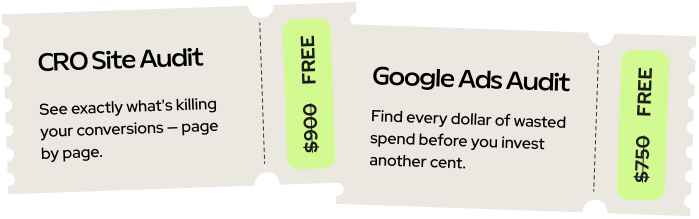
Just honest findings delivered within 2 business days.