


Why Your Shopify Checkout Is Quietly Costing You Thousands in Lost Revenue
Shopify checkout optimization is the single highest-ROI lever most store owners ignore - because they're too busy chasing new traffic instead of converting the traffic they already have.
Think of it this way: your checkout page is the cash register. If the line is too long, the price tag suddenly changes, or the card machine looks sketchy, people leave. This guide shows you how to fix each of those problems with specific, actionable steps.
- Why Do Shoppers Abandon Carts on Shopify?
- How to Calculate Your Shopify Cart Abandonment Rate
- Enable Guest Checkout and Remove Account Walls
- Show All Costs Upfront to Eliminate Surprise Fees
- Optimize Your Checkout for Mobile Shoppers
- Set Up Shop Pay and Accelerated Payment Options
- Build an Abandoned Cart Recovery Email Sequence
Why Do Shoppers Abandon Carts on Shopify?
The biggest culprit? Unexpected costs. Nearly half of all cart abandonment happens because shoppers encounter fees they didn't anticipate - shipping charges, taxes, or handling fees that suddenly appear at checkout like an uninvited guest at dinner. The second biggest reason is forced account creation. About one in four shoppers will abandon a purchase rather than fill out a registration form. Complex or lengthy checkout flows account for another 22% of drop-offs, while limited payment options push away roughly 13% of buyers.
Think about the last time you walked into a store, picked up a shirt, then saw the price was different at the register. You probably put it down and walked out. That's exactly what's happening on your checkout page - except you can't see the customer's face when they leave.
Here's what makes this so important for Shopify merchants specifically: these aren't exotic problems that require custom development. Every single one of these issues has a built-in fix or a well-tested app solution. The stores that reduce cart abandonment don't do anything revolutionary. They just systematically remove friction, one checkout step at a time.
How to Calculate Your Shopify Cart Abandonment Rate
The formula is simple: take the number of completed purchases, subtract it from the number of carts created, divide by the number of carts created, and multiply by 100. If 100 people add items to their cart and 30 complete a purchase, your abandonment rate is 70%.
The good news is Shopify tracks this automatically. Head to your Shopify admin, go to Analytics, then Dashboard. Look at the "Online store conversion rate" section. You'll see sessions that added to cart versus sessions that converted. The gap between those two numbers is your abandonment zone - and it's likely bigger than you think.
What's a Good Shopify Checkout Conversion Rate?
Don't just look at the overall number, though. Break it down by device type. Mobile abandonment typically runs 10-12 percentage points higher than desktop. If your mobile traffic accounts for 60% or more of your visits (which is common), your mobile checkout experience is the biggest lever you can pull.
.svg)
Enable Guest Checkout and Remove Account Walls
The fix takes about 30 seconds. In your Shopify admin, go to Settings, then Checkout. Under "Customer accounts," select the option that allows customers to check out without an account. You can still offer account creation after the purchase is complete - when the customer has already committed and received their confirmation email. Post-purchase account creation feels like a bonus ("Save your details for faster checkout next time"), not a barrier.
When Requiring Accounts Actually Makes Sense
The general rule is straightforward: if you're a DTC brand selling directly to consumers, guest checkout should always be available. Every additional form field between your customer's credit card and the "Complete Order" button is a small tax on conversion. Collect only what you need to fulfill the order - name, email, shipping address, and payment. Everything else can wait.
Show All Costs Upfront to Eliminate Surprise Fees
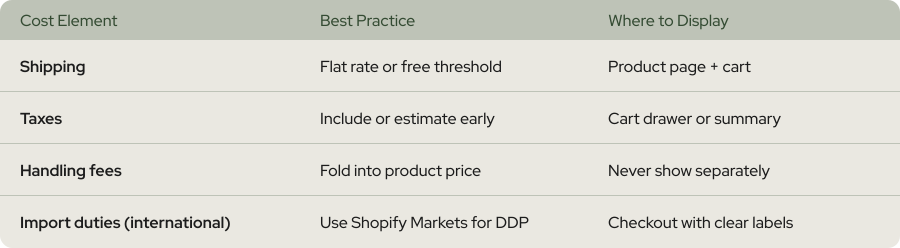
Transparency isn't just good ethics - it's good economics. Think of your pricing like a restaurant menu. You want the customer to know exactly what they're paying before the bill arrives. No one likes a surprise surcharge for "table service" after they've already eaten.
Here's how to implement transparent pricing on your Shopify store. First, display shipping costs (or free shipping thresholds) on your product pages. Use a simple banner like "Free shipping on orders over $75" that stays visible throughout the shopping experience. Second, add a running cart total that includes estimated taxes and shipping. Shopify's cart page supports this with apps like Hextom Shipping Bar or built-in cart note features.
The Free Shipping Threshold Strategy
If free shipping isn't viable for your margins, be upfront about shipping costs from the start. A flat-rate shipping fee displayed on the product page is always better than a variable fee that only appears at checkout. Predictability builds trust, and trust drives conversions.
Optimize Your Checkout for Mobile Shoppers
Imagine trying to fill out a form while holding a coffee in one hand and your phone in the other. That's your mobile shopper's reality. Every tiny text field, every dropdown menu that doesn't respond to thumb taps, every page that requires horizontal scrolling - each one is a reason to close the tab and move on.
Start with the basics. Use Shopify's built-in one-page checkout, which consolidates shipping, payment, and order summary into a single view. Make sure your buttons are thumb-friendly (at least 44x44 pixels). Enable address auto-complete so shoppers aren't typing their full address on a tiny keyboard. Test your entire checkout flow on at least three different phone sizes before making any changes live.
Speed Is a Conversion Factor
Run your store through Google PageSpeed Insights and focus on mobile scores specifically. Compress images, minimize JavaScript, and leverage Shopify's CDN. If you're using Shopify Plus, take advantage of checkout extensibility to strip out unnecessary scripts that slow things down. Every 100 milliseconds of improvement matters when you're multiplying across thousands of sessions.
Set Up Shop Pay and Accelerated Payment Options
Here's why that number is so dramatic. Shop Pay has a network of over 150 million buyers who have already saved their shipping and payment information. When one of those buyers lands on your store, they can complete checkout with a single tap. No forms, no typing, no friction. It's like the difference between standing in line at a bank and using a tap-to-pay card - same transaction, completely different experience.
To enable Shop Pay, go to Settings, then Payments in your Shopify admin. In the Shopify Payments section, click Manage. Check the Shop Pay box and save. That's it. You've just given a large portion of your potential customers a dramatically faster checkout experience.
But Shop Pay isn't the only accelerated option you should offer. Add Apple Pay, Google Pay, and PayPal Express. For higher-ticket items, consider enabling buy-now-pay-later options like Shop Pay Installments, Klarna, or Afterpay. BNPL options have been shown to boost conversions for higher-ticket purchases, and they address a completely different abandonment trigger: "I want this, but not at full price right now."
Why Multiple Payment Options Reduce Abandonment
The goal isn't to clutter your checkout with 15 payment logos. It's to cover the four or five methods that your specific customer base actually uses. Check your Shopify analytics to see which payment methods are most popular, and make sure those are prominent and functional.
Build an Abandoned Cart Recovery Email Sequence
The average Shopify store recovers about 10-11% of abandoned carts through email. But well-optimized sequences can push that to 15-20%, which translates directly into recovered revenue you'd otherwise lose completely. Think of abandoned cart emails as your store's safety net. They catch the customers who genuinely wanted to buy but got distracted.
A high-performing recovery sequence typically includes three to five emails, spaced out strategically. Here's a proven structure.
The first email goes out within one hour of abandonment. Keep it simple - a reminder with the product image and a direct link back to checkout. No discount yet. Many shoppers just need a nudge, and giving away margin on the first touch is leaving money on the table.
The second email goes out 24 hours later. Add social proof: customer reviews, star ratings, or a "selling fast" urgency element. This email targets the shopper who's comparing options or second-guessing the purchase.
The third email arrives at the 48-72 hour mark. This is where you introduce a small incentive if your margins allow it - free shipping, a 10% discount, or a free gift with purchase. By this point, you've exhausted the easy recoveries and need something extra to bring back the undecided.
SMS Recovery as a Complement to Email


Do you have any questions left?
Here are the answers for you
A cart abandonment rate below 60% is considered strong for most Shopify stores. The industry average sits around 70%, so anything meaningfully below that puts you ahead of most competitors. However, "good" depends on your product category and price point. Luxury and high-ticket stores naturally see higher abandonment (people take longer to decide), while consumables and essentials tend to see lower rates.
Yes. By consolidating shipping, payment, and order review into a single view, the one-page checkout reduces perceived effort and eliminates page-load delays between steps. Shopify Plus merchants who adopted it early reported measurable improvements in checkout completion rates. It's now available across all Shopify plans.
Not in the first email. Start with a simple reminder, then add social proof in the second message. Only introduce a discount in your third or fourth email. Offering discounts too early trains shoppers to abandon on purpose and erodes your margins over time. Reserve incentives for the customers who genuinely need a final push.
A rate above 80% usually signals a specific, fixable problem - not a general issue. Check for hidden fees appearing at checkout, forced account creation, limited payment options, or slow page load times. Run through your own checkout on mobile as if you were a first-time customer. The friction point is almost always obvious when you experience it firsthand.
Shopify includes built-in abandoned checkout recovery emails, which work for basic recovery. However, paid tools like Klaviyo or Omnisend offer multi-email sequences, SMS integration, segmentation, and A/B testing that significantly increase recovery rates. If your store generates consistent traffic, the ROI on a dedicated recovery app pays for itself quickly.
Absolutely. A specialized CRO agency like Weblics runs structured A/B tests on your checkout flow, analyzes heatmaps and session recordings, and identifies friction points you might miss. The advantage of working with experts is speed and precision - instead of guessing which changes matter, you test hypotheses backed by data and only implement what's proven to lift conversions.
Every plan includes complete care-driven CRO - what varies is testing capacity and analysis depth.
All Plans Include:
Onboarding (First 5 days):
- Founder interviews & business deep-dive
- Comprehensive technical website audit
- Customer psychology analysis (ICP, 5 WHYs, SWOT)
- AI-trained buyer personas creation
- Ad creatives audit
- Marketing ecosystem review
Ongoing (Continuous):
- Psychology-first hypothesis generation
- Conversion-focused UX/UI design
- Strategic copywriting
- Shopify development & implementation
- A/B testing & QA
- Transparent reporting & documentation
- Strategy meetings (weekly or bi-weekly)
What Changes by Tier:
- Tests per month: 2, 4, 6, or 8 A/B tests
- Meeting frequency: Bi-weekly (Starter) or Weekly (Growth+)
- Analysis depth: Post-purchase surveys, support analysis, inventory strategy, KPI planning, quarterly planning (varies by tier)
Bonus (Growth+): Comprehensive email marketing audit from specialist partners
Flexible plans give you complete control over costs. You pay for the essential CRO work - strategy, hypothesis generation, analysis, A/B test and project management - whilst design, development, and QA are billed separately at $70/hourly only when you need them.
This is perfect if you have an in-house design or development team, or if you want to manage exactly what gets built and when. You're not locked into paying for services you don't need.
Scale plans include everything - strategy, analysis, design, development, QA, and implementation - in one predictable monthly retainer. No surprises, no separate invoices, just complete care-driven CRO delivered autonomously.
Choose Flexible if: You have internal resources or want precise cost control
Choose Scale if: You want fully autonomous, hands-off CRO with everything included
Transparent pricing based on your monthly traffic.
We charge based on traffic volume because testing capacity and statistical significance directly correlate with session count. The more traffic you have, the faster we can run tests and deliver results.
Pricing:
- Starter (50K-75K sessions): $1,650/mo - 2 tests
- Growth (75K-150K sessions): $3,500/mo - 4 tests
- Scale (150K-350K sessions): $6,600/mo - 6 tests
- Enterprise (350K+ sessions): $10,700/mo - 8 tests
No long-term contracts. Cancel anytime.
Every plan includes our 30-day profitability guarantee.
Not sure which plan fits?
Book a discovery call - I'll help you find the perfect match for your business.
Our battle-tested frameworks and systems validate every hypothesis before we build.
Phase 1: Onboarding (First 5 days)
- Deep-dive into your business, customers, and psychology
- Comprehensive technical audit
- 25+ care-driven optimisation hypotheses
- Custom roadmap delivered
Phase 2: Operational (Continuous)
- Validate hypotheses through AI-trained buyer personas
- Ask: "Does this genuinely serve customer needs - not manipulate?"
- Design, develop, and implement winning tests
- Rigorous QA across all devices
- Launch and monitor
Phase 3: Ongoing Analysis (Monthly)
- Behavioural segmentation & data analysis
- Post-purchase survey analysis (Growth+ plans)
- Support ticket insights analysis (Growth+ plans)
- Inventory strategy (Growth+ plans)
- Monthly KPI planning (Growth+ plans)
- Quarterly strategic planning (Scale+ plans)
Yes - but as an addition to our battle-tested frameworks, not the foundation.
We've built a proprietary AI system that validates every hypothesis against your actual buyer personas before we build anything. This ensures we only create optimisations your customers will genuinely respond to.
How it works:
- Our frameworks identify conversion opportunities
- We generate psychology-first hypotheses
- AI-trained buyer personas validate each hypothesis
- We ask: "Does this genuinely serve customer needs—not manipulate?"
- Only validated hypotheses get built and tested
This approach achieves 84% test success rate vs 45% industry average - because we validate with your actual customers before building, not after.
AI enhances our care-driven methodology. It doesn't replace genuine customer understanding.
Simply upgrade to the next tier for more included tests and enhanced ongoing analysis.
We're completely flexible - scale up or down based on your business needs. No penalties, no long-term lock-ins.
Want to discuss expanding your plan? Your dedicated CRO manager can adjust your package anytime.
Yes. No long-term contracts. Cancel anytime.
We earn your business every single month through results - not by trapping you in contracts.
If we don't make you profitable within 30 days, you pay nothing more until we deliver. That's our guarantee.
Most clients stay because care-driven CRO compounds month after month - each winning test keeps generating revenue whilst new tests add even more. But you're never locked in.
We're confident our results will speak for themselves.
Zero micromanagement required. We operate completely autonomously.
We're an extension of your business - making decisions with your profit margins AND mission in mind, not billable hours.
Your involvement:
- Initial onboarding: 2-3 hours (interviews, strategy alignment)
- Weekly/bi-weekly meetings: 30-60 minutes (strategy updates, results review)
- Ad-hoc questions: Slack chat for quick questions
We handle everything else:
- Hypothesis generation
- Design and copywriting
- Development and implementation
- QA across all devices
- A/B test management
- Data analysis and reporting
You focus on running your business. We focus on adding $50K+ monthly to your revenue.
That's the partnership.
We integrate with your existing tools—no forced changes.
Analytics: Shopify Analytics, Microsoft Clarity, GA4
Testing: Intelligems
Management: ClickUp, Figma, Slack
Your data stays in your systems. We integrate seamlessly.
We sign NDAs before any work begins. Your data is protected - always.
Security measures:
- Non-Disclosure Agreement (NDA) signed upfront
- Limited access permissions (only what's necessary)
- Data stored in your systems (we don't migrate your data)
- Team access restricted to assigned personnel only
- Regular security audits
We treat your business like our own - that includes protecting your data like it's our own.
You maintain full control over all access permissions and can revoke them anytime.
Guaranteed profitability in 30 days. $50K+ monthly revenue boost within 60 days.
Tangible outcomes:
But more than numbers - you'll understand your customers deeply, remove friction authentically, and build genuine relationships that compound revenue month after month.
- Increased conversion rates (50-100%+ improvements common)
- Higher average order values
- Improved ROAS (return on ad spend)
- Enhanced customer lifetime value
- Sustainable, compounding revenue growth
Our 84% hypothesis success rate means tests consistently work.
Real client results:
- ForKeeps Merch: $2.3M added revenue (+70% conversion rate)
- Organic Muscle: 128% conversion rate increase
- CKitchen: $1.1M added revenue over 22 months
- Mayven Studios: 50% conversion increase in 2 months
For as long as care-driven CRO continues delivering massive ROI - which typically compounds over 6+ months.
Why long-term partnerships work:
- Each winning test keeps generating revenue permanently
- New tests stack on top of previous wins
- Deeper customer understanding leads to better hypotheses
- Compounding effects multiply over time
Typical timeline:
- Months 1-3: Foundation + initial wins ($50K+ monthly added)
- Months 4-6: Compounding effects visible (wins multiply)
- Months 7-12: Sustainable growth system established
- 12+ months: Category-leading conversion rates achieved
Most clients stay 12-24+ months because results compound. But there's no lock-in - cancel anytime.
We earn your business every month through genuine results, not contracts.
Three simple steps:
Step 1: Book a Discovery Call 30-minute conversation to discuss your traffic, goals, and biggest challenges. We'll explore if we're a good fit and map out your path to $50K+ monthly revenue growth.
Step 2: Get Your Free Audit We'll conduct a comprehensive CRO audit of your website, deliver 25+ psychology-first hypotheses, and show you exactly where your biggest revenue opportunities are.
Step 3: Choose Your Plan & Launch Select the plan that fits your traffic and business needs. We'll onboard you within 5 days and have your first A/B test live within 10 days.
Ready to grow with care-driven CRO?
Or have more questions? Email us: garyk@weblics.agency

Wait… Claim your free bonuses
Find out exactly where your store is leaking revenue — and where your ad spend is going to waste. No pitch, just data.
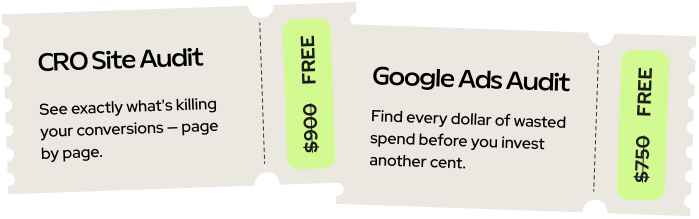
Just honest findings delivered within 2 business days.