


Why your product page elements look right and still don't convert
- The trust badge bar that's actually killing trust
- Why your add-to-cart button is below the fold on mobile
- Product images that look pretty but answer nothing
- Variant pickers your customers can't read
- The description block that nobody scrolls to
- Review widgets that hide the star rating
- Shipping and returns info you hid in the footer
- Urgency timers that triggered false-alarm mode
- Upsells that show up before the main buy decision
- The "sticky" bar that's competing with itself
The trust badge bar that's actually killing trust
In one audit published in 2025, a store running 11 badges dropped to 6 strategically placed ones and saw conversion jump from 2.1% to 3.4%. That's a 62% lift from removing badges, not adding them. The reason is simple: badge bloat signals desperation, not credibility. When a stranger wears five wedding rings, you don't trust them more. You wonder what they're hiding.
The other problem is placement. Badges under the price push the buy button further down the page. On mobile, that's often the difference between an add-to-cart above the fold and one that requires a scroll. You've traded a conversion action for a decorative row of icons nobody was asking for.
Research from CXL and Baymard shows security badges only work near payment fields at checkout, where payment-safety anxiety peaks. On a product page, shoppers aren't worried about payment yet. They're worried about whether this thing is worth buying.
Why your add-to-cart button is below the fold on mobile
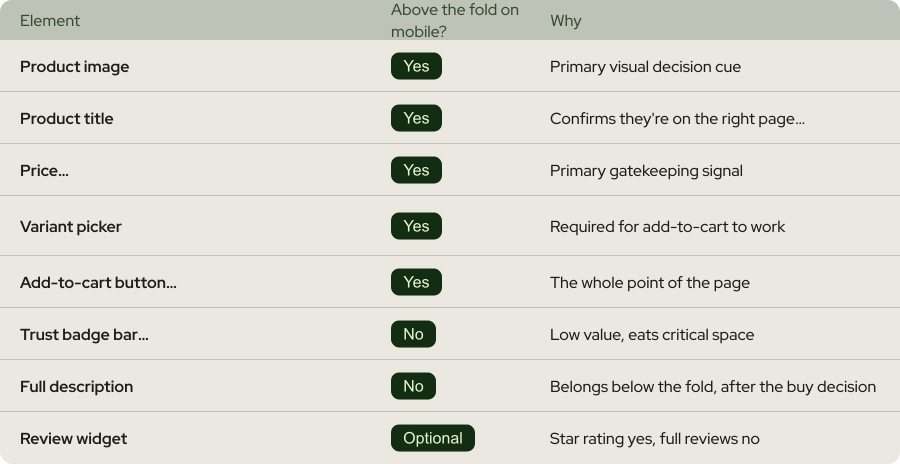
Heatmap data across thousands of Shopify stores is blunt about this: roughly 50% of visitors scroll past the fold, 35% reach the description, and only 20% make it to reviews at the bottom. But those numbers assume your buy button is at the top. If it's buried under a trust badge bar, a shipping calculator, a variant picker, and three lines of marketing copy, a chunk of traffic never sees it at all.
The fix has two parts. First, audit what's above the fold on mobile right now. Pull up your product page on your own phone (not Chrome DevTools) and ask: can I see the image, the price, the variant picker, and the buy button without scrolling? If the answer is no, something needs to go.
Second, add a sticky add-to-cart bar. Stores that implement it typically see 8-15% conversion lifts, with the biggest gains on mobile. It's not clever. It's just always visible, which means the buy decision never has to survive a scroll-back.
Product images that look pretty but answer nothing
Most product pages fail this test. They have one beautiful lifestyle hero shot, maybe a flat lay, and nothing else. No scale reference, no close-up of the detail that matters most, no "this is what it looks like on a 5'4" person versus a 6'2" person". Baymard's product page benchmark found that roughly 28% of sites don't offer in-scale images and 25% lack enough image resolution or a functional zoom.
The cost of this is a double hit. You lose the sale upfront because shoppers can't mentally try the product. And when they do buy on incomplete information, returns spike. A 2024 industry report put US returns at $890 billion, with 71% of shoppers citing "didn't match the description" as the reason.
Here's the stack that actually answers buyer questions:
The hero shot shows the product on a clean background, zoomable to at least 2000x2000px. Then a lifestyle shot showing the product in use, with a visible scale reference (a hand, a phone, a body). Then a close-up of the specific detail people zoom in on: the stitching, the finish, the texture, the port. Then a back-of-product shot, because shoppers always want to see it. And if the product has colour or size variants, each one gets its own image set. Not a single shot with a dropdown.
Variant pickers your customers can't read
The most common variant picker failures look harmless on a design review. Tiny text swatches nobody can tap on mobile. Colour swatches that are all slightly different shades of black (charcoal, onyx, jet, raven). Size dropdowns instead of visible buttons. Variants that are out of stock but still show as selectable. Each one creates a small "wait, what" moment. And in CRO, every "wait, what" is a conversion off-ramp.
Fix the picker by making every option do two things: look obviously different from the others, and show its own state clearly. If you're selling colours, use actual colour swatches, big enough to tap on a phone (44x44 pixels minimum). If you're selling sizes, show them as buttons with clear selected and unselected states. If an option is out of stock, grey it out and label it "Sold out" so people don't waste a tap finding out.
And if someone picks a variant, the image should update. If they select "Olive Green" and the hero photo stays on "Midnight Black", they'll think the product is wrong and leave. That's a 2-second fix in Shopify's theme editor that most stores still haven't made.
The description block that nobody scrolls to
So the first problem is a wall of text that doesn't survive a scan. The second problem, which is bigger, is that the description often answers the wrong questions. It talks about the brand story, the inspiration, the "handcrafted in small batches" bit. What shoppers want to know is: does it fit, what's it made of, how do I care for it, how big is it, will I need to return it.
Think of your description like a flight attendant's safety briefing. Nobody's reading it word for word. They're scanning for the parts that matter to them specifically. Your job is to make the scannable parts the most valuable ones.
A description that converts has four pieces, in this order. One: the one-line benefit that restates what this is and why it matters. Two: a spec block with material, size, weight, what's in the box. Three: the FAQ-style answers to the three questions your support team gets most (fit, care, compatibility). Four: the brand story, if you must, at the bottom where motivated readers can find it.
Review widgets that hide the star rating
The common mistake is installing a review app, dropping the widget at the bottom of the page, and calling it done. The star rating, which is the only piece most shoppers will see, ends up 4-5 scrolls below the fold. Nobody sees it. The 45% lift becomes a 0% lift.
The other common mistake is the opposite: putting the whole review widget, with photos and filters and sort options, above the fold. Now it competes with the buy button for attention and adds load time to a page that's already heavy.
The pattern that works is split placement. Put the star rating and review count right next to the product title, above the fold. "4.8 stars from 2,847 reviews" is the single most persuasive line of copy on most product pages, and it costs you nothing but proper placement. Then put the full review section lower down, after the description, where motivated buyers will find it when they want social proof before committing.
One more thing: let people filter by negative reviews. Counterintuitively, showing one-star reviews has been shown to lift conversions by around 85%, because shoppers trust a product more when they can see it's not being hidden from them. A product with only five-star reviews looks fake. A product with mostly fives and a few honest twos looks real.
Shipping and returns info you hid in the footer
Which makes it strange that most product pages bury shipping info in the footer. Shoppers then add the product to cart, hit checkout, discover the $12 shipping charge, and leave. You just paid for a shopper to get halfway through your funnel before learning the deal-breaker.
The fix is to put shipping and returns info directly next to the add-to-cart button, before the decision is made. One line, clear, specific. "Free shipping on orders over $75. 30-day returns." One small case study from BuildGrowScale showed that moving return policy from footer to near the CTA lifted add-to-cart by roughly 23%. That's not a typo.
The more advanced version is a shipping calculator that shows the real cost based on the shopper's location. It's more work to set up, but it removes the single biggest checkout-stage surprise. If your margin can handle free shipping above a threshold, say so on the product page. If it can't, say that too. Clarity beats optimism. Shoppers would rather know the truth on the product page than discover it at checkout.
Urgency timers that triggered false-alarm mode
Fake urgency triggers what you could call "false-alarm mode". The shopper's brain recognises the tactic, distrust goes up, and now every other element on the page has to fight a trust deficit you created yourself. You didn't speed anyone up. You reminded them this might be a sketchy store.
This doesn't mean urgency is dead. Real scarcity ("Only 3 left at this price"), real deadlines ("Free next-day shipping if you order by 3pm"), and real stock counts ("87 sold this week") all work because they're verifiable. What kills conversions is the countdown that's been running for six months.
Upsells that show up before the main buy decision
The issue is cognitive load. A product page is a single-product page for a reason. Its only job is to convert interest in this specific item. When you stack upsells, bundles, and "frequently bought together" modules above the decision point, you split attention across five decisions instead of one. Classic choice-overload territory, and it hits conversion the same way a loaded restaurant menu makes you order the chicken you didn't want.
The order that works is: decide on this product, add to cart, then see the upsell. In the cart drawer, on the cart page, or on the post-add pop-up, you've earned the right to suggest complementary items. On the product page itself, keep the cross-sell section below the fold, below the description, and labelled clearly as "You might also like" or "Related products". That's where browsing behaviour lives. Not above the buy button.
One exception worth knowing: bundle offers that genuinely increase value ("Buy 2, get 15% off") can work above the fold if they're tied to the product being viewed. Not four random products, but a clear "2-pack" or "complete the set" offer. That's not an upsell, it's a variant.
The "sticky" bar that's competing with itself
Each sticky element eats screen real estate, usually on the exact part of the screen where the buy decision happens. On a mobile screen that's already small, four stacked bars at the bottom can occupy 40%+ of the visible area. The shopper doesn't see a product page, they see a compliance website with some product underneath.
Audit your sticky elements with a simple test: load your product page on a phone, scroll to the middle of the page, and count how many things are fixed in position (top or bottom of screen). If the answer is more than two, one of them needs to be dismissible-and-stay-dismissed, and one of them probably needs to go entirely.
The hierarchy that tends to work is one sticky bar at the bottom (the add-to-cart bar), one dismissible announcement bar at the top (if you need it), and nothing else stuck to the screen. Chat widgets can float, but they shouldn't be a full-width bar. Cookie banners should disappear on accept or dismiss, permanently. Popups should fire on exit intent, not immediately on page load.
Worth a Read


 Any questions? Let’s chat
Do you have any questions left?
Here are the answers for you
Trust badges aren't inherently bad. Badge bloat is. On a product page, 1-2 specific trust signals (a named guarantee, a review count) outperform a stacked row of generic security icons. On checkout, near the payment fields, security badges work well because payment-safety anxiety is highest at that point. The rule is: use them where the anxiety lives, not everywhere.
Three diagnostics give you 90% of the answer. First, watch 20 session recordings of mobile users on a product page and note where people hesitate, scroll back, or bounce. Second, run a heatmap tool like Hotjar or Microsoft Clarity and look for dead zones (elements nobody clicks or reads). Third, look at your add-to-cart rate by device. If mobile is significantly below desktop, the problem is almost always above-the-fold layout.
No, it means you should be ruthless about which ones earn their space. On a product page, replace the badge bar with one plain-text guarantee next to the buy button. On checkout, keep the payment method logos and one security indicator near the payment fields. Everywhere else, delete. Fewer, clearer, closer to the decision point.
If you're converting, don't rip everything apart. Test changes one at a time. Start with the highest-impact, lowest-risk changes: adding a sticky add-to-cart bar, moving shipping info next to the CTA, cleaning up the badge bar. Measure each for at least two weeks or 1,000 conversions before moving to the next. CRO is iterative, not a redesign.
For most of them, no. Shopify's Online Store 2.0 themes let you reorder sections, add sticky bars, and tweak the above-the-fold layout without code. For variant picker fixes, image gallery updates, and review widget placement, the theme editor handles it. You only need a developer for custom sticky bar behaviour, advanced image zoom, or variant-specific image swapping on older themes.
A focused audit and fix-list usually takes 2-3 weeks of work and produces measurable lift within a month. At Weblics, we run CRO audits on Shopify stores in 30 days with a profitability guarantee. Most stores have 3-5 product page issues that account for 60-80% of the conversion gap, and they're fixable without redesigning the whole page.
Every plan includes complete care-driven CRO - what varies is testing capacity and analysis depth.
All Plans Include:
Onboarding (First 5 days):
- Founder interviews & business deep-dive
- Comprehensive technical website audit
- Customer psychology analysis (ICP, 5 WHYs, SWOT)
- AI-trained buyer personas creation
- Ad creatives audit
- Marketing ecosystem review
Ongoing (Continuous):
- Psychology-first hypothesis generation
- Conversion-focused UX/UI design
- Strategic copywriting
- Shopify development & implementation
- A/B testing & QA
- Transparent reporting & documentation
- Strategy meetings (weekly or bi-weekly)
What Changes by Tier:
- Tests per month: 2, 4, 6, or 8 A/B tests
- Meeting frequency: Bi-weekly (Starter) or Weekly (Growth+)
- Analysis depth: Post-purchase surveys, support analysis, inventory strategy, KPI planning, quarterly planning (varies by tier)
Bonus (Growth+): Comprehensive email marketing audit from specialist partners
Flexible plans give you complete control over costs. You pay for the essential CRO work - strategy, hypothesis generation, analysis, A/B test and project management - whilst design, development, and QA are billed separately at $70/hourly only when you need them.
This is perfect if you have an in-house design or development team, or if you want to manage exactly what gets built and when. You're not locked into paying for services you don't need.
Scale plans include everything - strategy, analysis, design, development, QA, and implementation - in one predictable monthly retainer. No surprises, no separate invoices, just complete care-driven CRO delivered autonomously.
Choose Flexible if: You have internal resources or want precise cost control
Choose Scale if: You want fully autonomous, hands-off CRO with everything included
Transparent pricing based on your monthly traffic.
We charge based on traffic volume because testing capacity and statistical significance directly correlate with session count. The more traffic you have, the faster we can run tests and deliver results.
Pricing:
- Starter (50K-75K sessions): $1,650/mo - 2 tests
- Growth (75K-150K sessions): $3,500/mo - 4 tests
- Scale (150K-350K sessions): $6,600/mo - 6 tests
- Enterprise (350K+ sessions): $10,700/mo - 8 tests
No long-term contracts. Cancel anytime.
Every plan includes our 30-day profitability guarantee.
Not sure which plan fits?
Book a discovery call - I'll help you find the perfect match for your business.
Our battle-tested frameworks and systems validate every hypothesis before we build.
Phase 1: Onboarding (First 5 days)
- Deep-dive into your business, customers, and psychology
- Comprehensive technical audit
- 25+ care-driven optimisation hypotheses
- Custom roadmap delivered
Phase 2: Operational (Continuous)
- Validate hypotheses through AI-trained buyer personas
- Ask: "Does this genuinely serve customer needs - not manipulate?"
- Design, develop, and implement winning tests
- Rigorous QA across all devices
- Launch and monitor
Phase 3: Ongoing Analysis (Monthly)
- Behavioural segmentation & data analysis
- Post-purchase survey analysis (Growth+ plans)
- Support ticket insights analysis (Growth+ plans)
- Inventory strategy (Growth+ plans)
- Monthly KPI planning (Growth+ plans)
- Quarterly strategic planning (Scale+ plans)
Yes - but as an addition to our battle-tested frameworks, not the foundation.
We've built a proprietary AI system that validates every hypothesis against your actual buyer personas before we build anything. This ensures we only create optimisations your customers will genuinely respond to.
How it works:
- Our frameworks identify conversion opportunities
- We generate psychology-first hypotheses
- AI-trained buyer personas validate each hypothesis
- We ask: "Does this genuinely serve customer needs—not manipulate?"
- Only validated hypotheses get built and tested
This approach achieves 84% test success rate vs 45% industry average - because we validate with your actual customers before building, not after.
AI enhances our care-driven methodology. It doesn't replace genuine customer understanding.
Simply upgrade to the next tier for more included tests and enhanced ongoing analysis.
We're completely flexible - scale up or down based on your business needs. No penalties, no long-term lock-ins.
Want to discuss expanding your plan? Your dedicated CRO manager can adjust your package anytime.
Yes. No long-term contracts. Cancel anytime.
We earn your business every single month through results - not by trapping you in contracts.
If we don't make you profitable within 30 days, you pay nothing more until we deliver. That's our guarantee.
Most clients stay because care-driven CRO compounds month after month - each winning test keeps generating revenue whilst new tests add even more. But you're never locked in.
We're confident our results will speak for themselves.
Zero micromanagement required. We operate completely autonomously.
We're an extension of your business - making decisions with your profit margins AND mission in mind, not billable hours.
Your involvement:
- Initial onboarding: 2-3 hours (interviews, strategy alignment)
- Weekly/bi-weekly meetings: 30-60 minutes (strategy updates, results review)
- Ad-hoc questions: Slack chat for quick questions
We handle everything else:
- Hypothesis generation
- Design and copywriting
- Development and implementation
- QA across all devices
- A/B test management
- Data analysis and reporting
You focus on running your business. We focus on adding $50K+ monthly to your revenue.
That's the partnership.
We integrate with your existing tools—no forced changes.
Analytics: Shopify Analytics, Microsoft Clarity, GA4
Testing: Intelligems
Management: ClickUp, Figma, Slack
Your data stays in your systems. We integrate seamlessly.
We sign NDAs before any work begins. Your data is protected - always.
Security measures:
- Non-Disclosure Agreement (NDA) signed upfront
- Limited access permissions (only what's necessary)
- Data stored in your systems (we don't migrate your data)
- Team access restricted to assigned personnel only
- Regular security audits
We treat your business like our own - that includes protecting your data like it's our own.
You maintain full control over all access permissions and can revoke them anytime.
Guaranteed profitability in 30 days. $50K+ monthly revenue boost within 60 days.
Tangible outcomes:
But more than numbers - you'll understand your customers deeply, remove friction authentically, and build genuine relationships that compound revenue month after month.
- Increased conversion rates (50-100%+ improvements common)
- Higher average order values
- Improved ROAS (return on ad spend)
- Enhanced customer lifetime value
- Sustainable, compounding revenue growth
Our 84% hypothesis success rate means tests consistently work.
Real client results:
- ForKeeps Merch: $2.3M added revenue (+70% conversion rate)
- Organic Muscle: 128% conversion rate increase
- CKitchen: $1.1M added revenue over 22 months
- Mayven Studios: 50% conversion increase in 2 months
For as long as care-driven CRO continues delivering massive ROI - which typically compounds over 6+ months.
Why long-term partnerships work:
- Each winning test keeps generating revenue permanently
- New tests stack on top of previous wins
- Deeper customer understanding leads to better hypotheses
- Compounding effects multiply over time
Typical timeline:
- Months 1-3: Foundation + initial wins ($50K+ monthly added)
- Months 4-6: Compounding effects visible (wins multiply)
- Months 7-12: Sustainable growth system established
- 12+ months: Category-leading conversion rates achieved
Most clients stay 12-24+ months because results compound. But there's no lock-in - cancel anytime.
We earn your business every month through genuine results, not contracts.
Three simple steps:
Step 1: Book a Discovery Call 30-minute conversation to discuss your traffic, goals, and biggest challenges. We'll explore if we're a good fit and map out your path to $50K+ monthly revenue growth.
Step 2: Get Your Free Audit We'll conduct a comprehensive CRO audit of your website, deliver 25+ psychology-first hypotheses, and show you exactly where your biggest revenue opportunities are.
Step 3: Choose Your Plan & Launch Select the plan that fits your traffic and business needs. We'll onboard you within 5 days and have your first A/B test live within 10 days.
Ready to grow with care-driven CRO?
Or have more questions? Email us: garyk@weblics.agency

Spending more on

Getting less back?
Your ads aren't broken. The store they land on is.
Send us your URL and we'll show you which leaks are eating your ad spend, and which one to fix first.

Just honest findings on your store, within 48h.